- Composed of hardware — the physical machine that processes data — and software — programs written with instructions that direct some task
- Hardware consists of the processor, memory (storage), and peripherals, which are connected by the system bus
- Among computer hardware components, the part most closely tied to the OS; it controls the operation of every device in the computer and performs computation
- A dedicated register is a register with a special purpose, such as the PC (program counter), status register, address register, instruction register, accumulator, etc.
- A register inside the computer's central processing unit (CPU) that holds small data such as computation processing, computation results, and return addresses.
- The pathway that physically connects hardware so they can exchange data with each other
- Carries the computer's various internal signals (data I/O signals, processor status signals, interrupt request and grant signals, clock signals, etc.) over the system bus
- Instruction fetch → instruction decode, counter update → operand fetch → instruction execution → store result
1. PC → MAR
2. MAR → MBR
PC + 1 → PC
3. MBR → IR
< Indirect cycle process >
1. IR -> MAR
2. MAR -> MBR
3. MBR -> IR
Interrupt
- An instruction that halts the currently running program and requests the execution of another program
- Improves the system's processing efficiency, and is used in multiprogramming by processing while changing the execution order of programs
- A hardware signal sent to the processor from an I/O device or program installed in the computer; a program that receives an interrupt halts execution and runs another program
- A single-processor computer can execute one instruction at a time, but using interrupts it can execute another program or instruction in between
- Needed for the system to properly handle situations such as unexpected user input, a sudden power outage, an urgent request from the computer system, execution of a wrong instruction, and completion of an I/O task
- It is a process of temporarily suspending and then resuming the normal execution of a program, but the user does not need to take separate interrupt action — the processor and OS handle it
- Used as a means to coordinate the operation of external devices with its own operation
- The control bus used for interrupt purposes is the interrupt request line
Interrupt request line
- Since it notifies the processor only when input occurs from the keyboard and then handles it, the processor does not have to monitor every event occurrence one by one.
- The processor does not need to directly check the state of external devices, so during this time it can perform other operations, raising the processor's efficiency
- Runs the interrupt handling program (interrupt service routine) according to the interrupt request signal
- Connected via single lines and multiple lines
- Single line: a method of connecting all devices capable of interrupt requests to the processor over a common single line. Since many devices are connected to one line, a function to identify which device requested the interrupt is needed.
- Multiple lines: a method of connecting every device to the processor over its own distinct line. The device that requested the interrupt can be identified immediately.
< Interrupt cycle process >
1. PC → MBR
2. interrupt routine address → PC
address stored in PC → MAR
3. MBR → MAR
Memory hierarchy
- A method proposed in the 1950s–1960s because of the price problem of main memory being too expensive
- Organizes memory hierarchically to mutually complement cost, speed, capacity, access time, etc.
◆ Registers
◆ Cache
◆ Main memory
◆ Secondary storage
Registers
- Inside the processor; the fastest memory that holds the data the processor will use
Main memory
- Located outside the processor, it stores the programs and data the processor will run, or stores the results the processor has processed
- Also called main storage or primary storage. DRAM (Dynamic RAM), which has high storage density and low price, is widely used
- Composed of many cells, and each cell is composed of bits
- If a cell is K bits, it can store 2^k values
- When storing data in main memory, it is stored split across one cell or several cells
- Cells are referenced by address; if n bits, the address range is 0 to 2^(n-1)
- Located between the processor and secondary storage, it plays the role of resolving the disk I/O bottleneck that occurs here
- To reduce the burden of the speed difference between the processor and main memory, a cache is sometimes implemented inside or outside the processor
Memory mapping
- The process of converting a logical address into a physical address by compilation
- Memory speed
- Expressed as memory access time and memory cycle time
Cache
- A high-speed buffer, inside or outside the processor, that compensates for the speed difference between the fast processor and the relatively slow main memory
- Cache performance depends on how much of the information the processor will reference later is contained in the small-capacity cache
▶ Cache hit: when the information the processor wants to reference is present

▶ Cache miss: when the information the processor wants to reference is absent
- Block size affects cache performance, because when actually running a program there is spatial locality and temporal locality with respect to the referenced memory
▶ Spatial locality: the characteristic that most programs re-reference the contents of addresses adjacent to a referenced address

▶ Temporal locality: the characteristic of re-referencing a once-referenced address soon
- Causes of spatial and temporal locality
▶ Programs tend to execute instructions sequentially, so instructions are adjacent in a specific region of memory.

▶ Because of loops (single loops, nested loops, etc.), even if a program repeats, it references only part of the memory region.

▶ Most compilers store data in arrays in adjacent blocks in memory. Therefore, since a program frequently accesses array elements sequentially, there is a tendency toward local array access.
Secondary storage
- Among peripherals, the hardware that stores programs and data
- Also called secondary storage or external storage
- Includes magnetic disks, optical disks, magnetic tapes, etc.
Memory management
- The concept of memory management
○ Memory management is the activity of allocating, removing, and protecting memory for processes

○ To run a program on disk, it is first loaded into memory, after which the memory manager allocates the reserved memory

○ So that multiple processes can reside in memory in a multiprogramming system, the OS dynamically subdivides memory
- Memory management policies
○ Fetch policy: deciding when to bring a process from disk into memory

    ▶ Demand fetch: an old method of loading the next process to execute into memory according to reference requests from the OS, system programs, user programs, etc.

    ▶ Anticipatory fetch: a method of loading into memory by predicting the system's requests in advance

○ Placement policy: deciding at which location in memory to store a process brought in from disk

○ Replacement policy: a replacement method that decides which process to remove among the processes currently loaded in memory when memory is not enough
- Two perspectives on memory
○ Logical perspective (logical address space)

    ▶ The space the programmer uses for programming

○ Physical perspective (physical address space)

    ▶ The space that actually stores data or programs
- Address translation of the memory device
○ Logical address → physical address through Memory Mapping

○ Executed in hardware, the Memory Management Unit (MMU)

○ Translation techniques

    ▶ Fixed partitioning

    ▶ Dynamic partitioning

    ▶ Paging

    ▶ Segmentation

    ▶ Paged segmentation
- Mapping
○ Linking logical addresses and physical addresses

○ Binding: the task that performs the mapping

    ▶ Compile → linking → dynamic linking
- Dynamic loading
○ A memory-efficient operating method that delays binding as much as possible and finalizes addresses just before execution

○ Instead of loading all routines into memory, stores them on disk in a replaceable form

○ Loads and runs only the main program first

○ When the main program needs another routine, it checks whether it is loaded in memory. If not loaded, it calls to load that routine into memory while updating the program's address table

○ Since dynamic loading does not load routines that will not be used into memory, it uses memory efficiently

○ Errors sometimes occur, but it is more useful when the overall program size is large
- Overlay
○ When the program to be run is larger than memory, the parts of the program not immediately needed can be set as overlays

○ A structure where only the instructions and data absolutely necessary for program execution are stored in the OS region and part of memory, and the remaining overlay region is called and loaded when needed
- Swapping (process replacement)
○ A process that has finished being allocated the processor and completed execution is sent to secondary storage (swap out), and a newly starting process is loaded into memory (swap in). Since a process must be in memory to run, it can temporarily move to disk and then return to memory to run again
- Memory loading methods
○ Contiguous memory loading methods

    ▶ Fixed partitioning

    ▶ Variable partitioning

○ Non-contiguous (distributed) memory loading methods

    ▶ Paging

    ▶ Segmentation
The concept of virtual memory
○ Logically separating the user and the logical address so that the user can assign addresses to a process exceeding main memory capacity and use memory without limit

○ Since the entire program does not run simultaneously, it can run even by loading only part rather than the entire requested memory

○ It keeps the active region in main memory and, when needed, stores process code and data between disk and memory and automatically transfers them back (swap in, swap out), reallocating the process; the address space stored on disk is handled as a cache, enabling efficient use of main memory

○ Solves the problem of main memory's limited capacity and overlay usage
Virtual memory management techniques
○ Paging memory management technique

    ▶ A technique that divides and manages the logical address into fixed blocks called pages

    ▶ Each page is mapped to a frame of physical memory

    ▶ Converts a logical address pointing to a page into a physical address pointing to a frame

○ Segmentation memory management technique

    ▶ A method of managing memory by dividing it into a set of segments

    ▶ A segment consists of a start address and a length value specifying the segment size

○ Paged Segmentation

    ▶ Composes segments of pages, and after referencing the segment table, references the page table.

    ▶ A logical address consists of a segment number, page number, and offset
I/O management
○ The concept of the I/O system and I/O module

    ▶ Includes not only hardware devices such as monitors and printers but also the I/O module

    ▶ The physical I/O device actually performs I/O, and the I/O module provides a method of transferring binary information between internal storage such as memory, the processor, and registers and the physical I/O device

    ▶ If the I/O module handles complex I/O-related work on behalf of the processor, it becomes an I/O channel or I/O processor; if it simply handles the processor's I/O-related work, it becomes an I/O controller or device controller
Functions of the I/O module
○ Controls various operations such as internal resources and data I/O, and provides timing functions

○ Since the I/O module handles the timing, data format, and mechanical details of external devices, the processor can control a device simply with commands like opening or closing a file

○ For the processor to send a command to an I/O device, it must specify the I/O device's identifier as an address

○ Methods of specifying addresses

    ▶ Dedicated I/O address method, where the memory address space and I/O address space exist separately

    ▶ Memory-mapped address method, which shares part of the memory address space as the I/O address space

        ◎ The memory-mapped address method offers various flexibility, such as using arbitrary machine instructions and addresses to specify an I/O device, and generates interrupt signals to notify data transfer completion

○ Provides the function of receiving commands from a process and recognizing related messages

○ The I/O module recognizes messages through the process of command decoding → data exchange → status reporting → address recognition

    ▶ Command decoding: receives and decodes commands from the processor.

    ▶ Data exchange: exchanges data with the processor over the data bus.

    ▶ Status reporting: checks the status of low-speed peripherals and reports to the processor.

    ▶ Address recognition: recognizes as an address to distinguish the various devices connected to the module.

○ Adjusts transfer speed using buffering

○ Detects errors
I/O methods
○ Process-controlled I/O

    ▶ Programmed I/O

    ▶ Interrupt-driven I/O

○ DMA I/O

○ I/O channel
Programmed I/O method
○ A form in which the processor's internal I/O data and address registers are connected to the I/O module

○ The simplest form that can transfer directly between the address register and the bus

○ When inputting data, it is transferred to the data register only one word at a time via the I/O module; from the I/O data register it is transferred to the arithmetic logic unit using a program

○ When outputting data, it moves from the arithmetic logic unit to the I/O data register and is transferred to the I/O module using a program
Interrupt-driven I/O method
○ After the I/O device completes a task, it stores the task-related status and result in memory and generates an interrupt to notify the processor

○ The processor that received the interrupt sends the I/O command and starts another command during the I/O task

○ A method where, instead of the processor checking the I/O device whether it needs the processor's help, the I/O device directly signals the processor

○ Suitable when irregular and fast responsiveness is required
I/O using an I/O channel
○ I/O channel: a device that couples the processor and main memory to I/O devices and controls I/O by the processor's commands

○ The channel subsystem can consist of several, coordinating access between the processor and main memory

○ The channel directly accesses memory using cycle stealing, and each I/O device is connected to the channel using a controller

○ The controller performs the function of communicating with the channel and controlling the device. Since similar devices use only one controller, only one device is active at a moment

○ Since the I/O channel has the ability to execute I/O instructions by extending the DMA concept, it has the authority to completely control I/O operations

○ In a computer system, I/O data is stored in main memory even without the processor executing I/O instructions

○ The processor instructs the I/O channel to execute a program in main memory to carry out I/O transfer. The I/O channel controls data transfer while executing instructions stored in main memory
Types of channels
○ Selector channel: keeps other devices from running until it finishes the I/O of a certain device. High-speed devices such as magnetic disks, magnetic tapes, and drums transfer data at high speed using multiplexer channels, so multiplexing with other devices is difficult. In this case, multiplexing is possible using a dedicated channel that processes one at a time.

○ Multiplexer channel: time-shares by byte to process the output of multiple devices. Used when connecting many low- to mid-speed devices (card readers, printers). Because the channel-memory link can transfer data faster than the data transfer speed between the device and channel, many slow I/O devices can operate simultaneously

○ Block multiplexer channel: combines the advantages of the selector channel and the multiplexer channel, processing multiple high-speed I/O devices in block units. It can activate several high-speed devices on the same channel. A channel command has the characteristic that, after performing an I/O command with one device, it automatically switches to performing a command with another device even without a separate instruction. One channel can use multiple I/O devices in a time-sharing manner, but at times it services only one device, so it is similar to the selector channel. However, unlike the multiplexer channel, it does not have to wait until it completes servicing another device.

○ Byte multiplexer channel: a channel that connects and multiplexes multiple relatively low-speed I/O devices. Since the processing speed of I/O devices is generally quite slow compared to the CPU's processing speed, it is effective to use the channel in a multiplexed way.
Overview of the Operating System
Definition
○ The most important system software that makes all H/W and S/W functions provided by the computer system usable

○ Provides maximum convenience to the user by managing and operating limited system resources so they can be used efficiently

○ A system program in charge of the interface function between the computer system and the user
Purpose of the operating system
○ The purpose of the OS is to manage and operate the computer system's resources (hardware resources, information) as efficiently as possible, thereby providing convenience to users; as a system program that exists between hardware and user programs, it provides a user interface, improves performance, and efficiently uses limited resources.

○ Its aim is to improve reliability, improve throughput, shorten response time, provide hardware — which offers only simple computation — in a way users can easily access, and support higher performance by efficiently controlling and operating limited system resources.

○ Improving throughput: enabling the maximum amount of work to be processed within a unit of time

○ Shortening response time: the time from when a user requests the computer system to process some task until obtaining the result; the shorter the better

○ Improving reliability: refers to how accurately the system solves a given problem

○ Improving availability: indicates how quickly the computer system can provide system resources when each user requests them

○ The OS's functions include program creation, program execution, I/O operation, file system manipulation, communication, error detection and response, resource allocation, accounting, protection, etc.
Structure of the operating system
○ Processor management (layer 1): in charge of synchronization and processor scheduling (CPU management)

○ Memory management (layer 2): in charge of memory allocation and reclamation (memory management)

○ Process management (layer 3): tasks such as process creation, removal, message passing, starting and stopping (process management)

○ Peripheral management (layer 4): grasping the status of peripherals and scheduling I/O devices (I/O management)

○ File (information) management (layer 5): in charge of file creation and deletion, opening and closing files, and file maintenance and management (file and data management)

○ The **kernel** isolates programs from hardware characteristics and, by interacting directly with hardware, provides consistent services to programs. The kernel's basic concepts are process and file management. Beyond that are I/O device management, memory management, the system-call interface, etc. Shells, utilities, or application programs communicate with the kernel through defined system calls. It is the core part of the OS read first when a UNIX-family system boots, residing in main storage and providing process scheduling, storage management, file system management, and the OS's inherent functions.

○ System call

    ▶ In dual mode, user mode cannot use privileged instructions, and in such cases the user process requests help from the OS — this is called a system call. That is, a system call provides an interface between a running program and the OS.

○ Dual mode structure

    ▶ Understanding the characteristics of normal mode (user mode) and supervisor mode (monitor mode)

    ▶ In a multiprogramming environment, an error in one running program can affect another running program, so appropriate protection is needed. Dual mode is one such protection mechanism; by providing two operating modes, it controls things so that potentially problematic instructions cannot be executed carelessly.

○ User mode: software in user mode operates without privileges granted and can access system resources only in a limited way. Protected subsystems each run in their own protected space and do not interfere with each other. That is, in user mode only a limited set of instructions can be used.

○ Monitor mode: also called kernel mode or supervisor mode; potentially problematic instructions are classified as privileged instructions, and such instructions are restricted to run only in monitor mode. In this mode, mode instructions can be used.

○ Processor management: the lowest level, dependent on hardware; tracks and manages runnable processes through process scheduling

○ Main storage management: the part of the processing unit that manages and controls access to main storage, performing functions such as address translation, storage protection, and buffer storage

○ Secondary storage management: a function that manages and controls access to storage devices such as hard disks and diskettes

○ I/O system management

    ▶ Understanding the function of device drivers

    ▶ Understanding the interrupt method and the DMA method

    ▶ Understanding buffering and spooling

○ The computer's I/O devices provide an efficient means of communication between the central system and the outside. I/O devices are also called peripherals; the most basic ones include the keyboard, display device, and printer, and secondary storage devices such as magnetic tape and magnetic disk.

○ Device driver -: I/O controller

    ▶ A program in charge of the interface between the OS, application programs, and hardware; it is the link connecting hardware and the OS/application programs, a program essential for hardware components to work properly under the OS, and is also called a device controller or driver. The device controller has one or more device registers to input commands into the device controller, and the device driver performs the function of generating these commands and checking whether they are carried out properly.

○ Interrupt and DMA

    ▶ The data I/O methods used in computer systems include I/O by program, I/O by interrupt, and I/O by DMA.

    ▶ In I/O by program, the data I/O operation is performed by the I/O instructions of the program the CPU runs. Therefore, to perform data transfer under program control, the CPU must continuously monitor the status of the peripheral to know whether it is ready to perform I/O.

    ▶ DMA (Direct Memory Access) is an interface method that controls direct data transfer between a peripheral and memory without going through the CPU; it is widely used for data transfer between high-speed peripherals (M/T, DISK, etc.) and the computer.
Buffering and spooling
○ Buffering: I/O devices and secondary storage operate at a very slow speed compared to the CPU due to mechanical factors. One way to compensate for this slow speed of I/O devices is buffering. As one record is read and the CPU begins computing on it, the I/O device reads the next needed record in advance and stores it in main storage, so that the CPU does not wait for the record it needs. The place where such pre-read records exist is part of main storage, called a buffer, and this series of processes is called buffering.

○ Spooling: whereas buffering uses main storage as a buffer, spooling uses the disk like a very large buffer. Processes use the disk — a virtual device — as a medium for input or output instead of going through the actual physical device, and then have the actual input or output device perform these.

○ File management: the OS manages programs and data by file and stores them on the storage device by file. It performs management of file operations, storage methods, access methods, etc.
The flow of OS technology development
○ Batch processing

○ Real-time processing

○ Time-sharing processing system

○ Distributed processing system

○ Multiprogramming

○ Multiprocessing
The concept of a process
○ A program that is currently running or is soon runnable

○ A program that has a PCB within the OS

○ Asynchronous activity

○ A dispatchable unit as an entity that a process allocates
Types of processes
○ Operating-system process

○ User process

○ Concurrent process

    ▶ Independent process: a process that neither affects nor is affected by other processes

    ▶ Cooperating process: a process that affects or is affected by other processes
States of a process
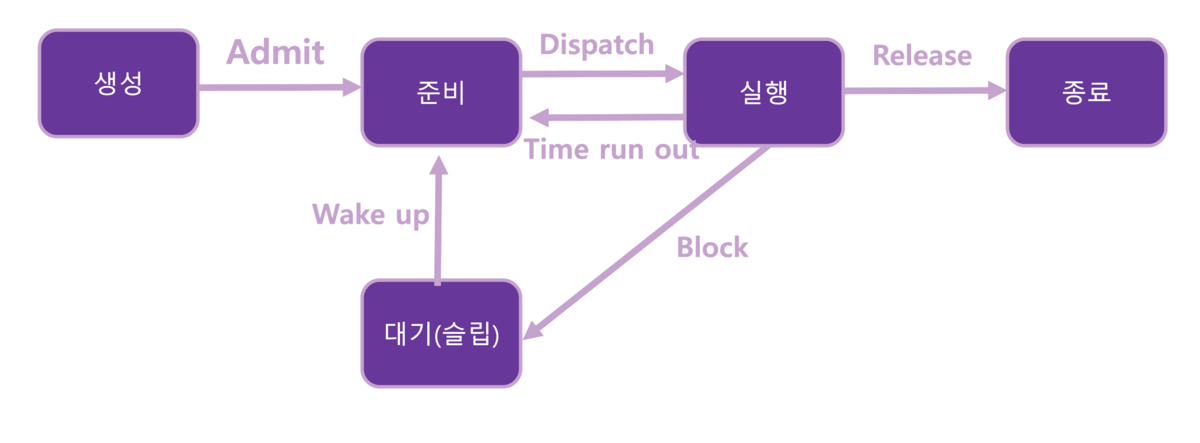
○ Divided into running and non-running states

    ▶ Running-state process: subdivided into running, waiting/suspended, and ready.

    ▶ Running: a state in which instructions are executed, a state occupying the processor

    ▶ Waiting/suspended: a state in which the processor waits for an event to occur

    ▶ Ready: a state in which a process waits to be allocated the processor

○ Process state transitions

    ▶ Admit: created → ready

    ▶ Dispatch: ready → running

    ▶ Time Run out: running → ready

    ▶ Blocked: running → sleep (waiting)

    ▶ Wake up: sleep (waiting) → ready

    ▶ Release: running → terminated

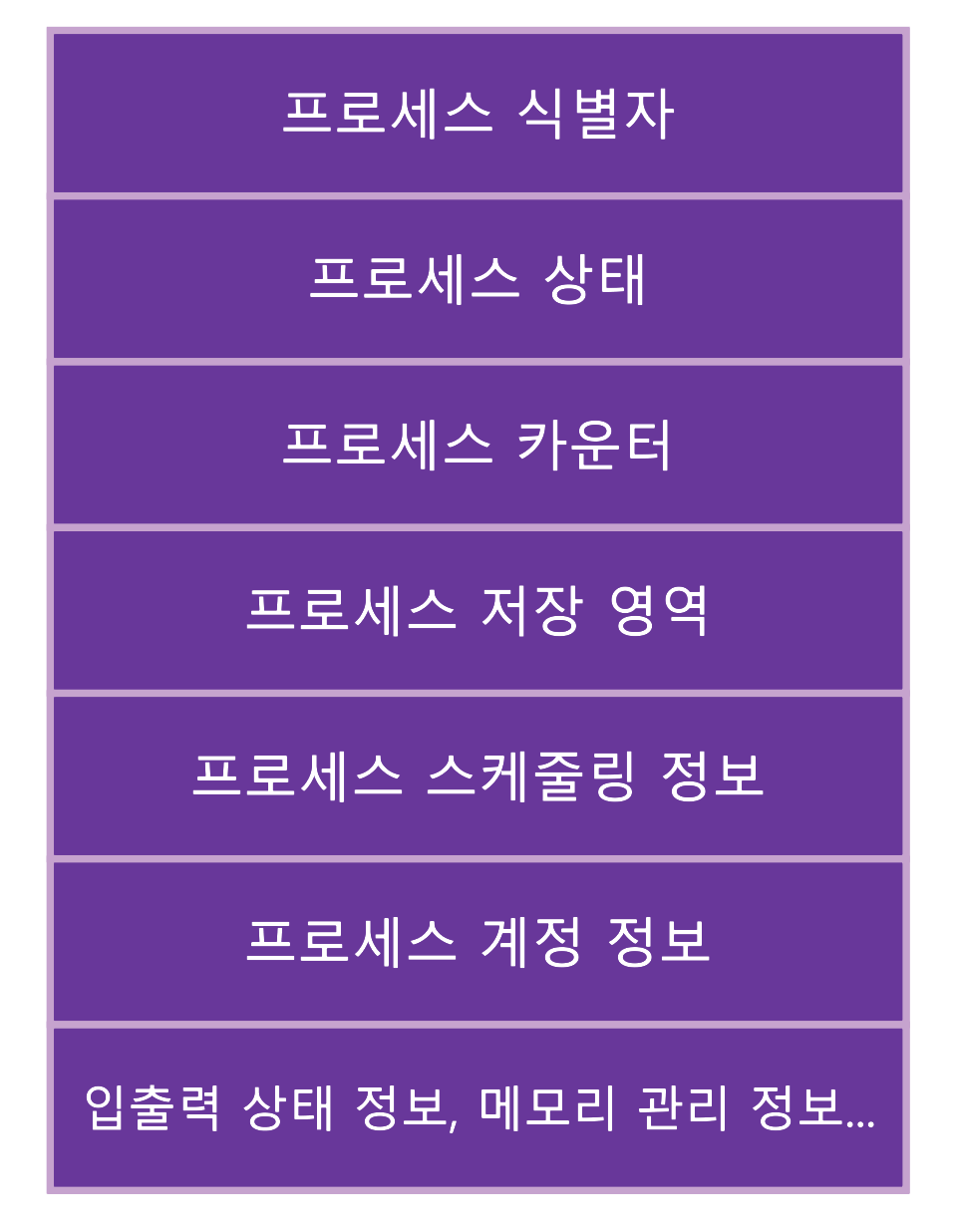
○ Process Control Block (PCB)
Thread
○ Like a process, the basic unit that uses the processor

○ An entity within a process (a single control flow that can independently execute instructions)

○ A process can have one or more threads.

○ A thread is also called a lightweight process.
CPU utilization
○ CPU utilization maximized ↑

○ Throughput maximized ↑

○ Turnaround time minimized ↓

○ Waiting time minimized ↓

○ Response time minimized ↓
CPU scheduling
○ The task of deciding when and to which process to allocate the CPU resource is called CPU scheduling.

○ Whenever the CPU is idle, the OS must select one of the processes in the ready queue and run it.

○ The selection procedure is performed by the short-term scheduler

○ The scheduler selects one of the processes in memory that are ready to run and allocates the CPU
Classification of process scheduling
○ Preemptive scheduling

    ▶ RR, SRT, MLQ, MFQ, etc.

○ Non-preemptive scheduling

    ▶ FIFO, SJF, HRN
Deadlock
○ A state in which there is one process waiting for an event that will never happen no matter how long it waits
The four necessary conditions for deadlock
○ Mutual exclusion

○ Hold and wait

○ No preemption

○ Circular wait
Secure operating system
○ Security in an OS is a term referring to both the policies and techniques that prevent illegal modification or reference of resources — protecting the system's resources from external intrusion.

○ A secure OS is an OS that additionally implants a security kernel — which integrates security functions into an existing OS — in order to protect the system from various possible hacks arising from security flaws inherent in the computer OS.
Main functions provided by a secure OS
○ Physical separation: a method that restricts each user to using only separate equipment

○ Temporal separation: a method that makes processes run only one at a time at the same time

○ Logical separation: a method that gives each process a logical area

○ Cryptographic separation: a method that encrypts internally used information so it cannot be known from the outside
Main functions provided by a secure OS
○ Protection targets and methods

    ▶ Memory

    ▶ Files or sets of data on secondary storage

    ▶ Directories of files

    ▶ Hardware devices

    ▶ Data structures such as the stack

    ▶ Instructions

    ▶ Passwords and user authentication mechanisms

    ▶ Protection mechanisms

○ Protection methods

    ▶ Physical separation: a method that restricts each user to using only separate equipment

    ▶ Temporal separation: a method that makes processes run only one at a time at the same time

    ▶ Logical separation: a method that gives each process a logical area

    ▶ Cryptographic separation: a method that makes internally used information unknowable from the outside

○ File system protection techniques

    ▶ File protection must be considered in parallel with the issue of file sharing. Protecting files unconditionally can bring about a waste of resources.

    ▶ File protection is a protection device set up by the file's owner to prevent unauthorized access by the programs of unqualified users
Secure OS and security kernel
○ Security functions of a secure OS

    ▶ User identification and authentication

    ▶ Discretionary/mandatory access control

       ▷ Discretionary Access Control (DAC): a method that restricts access to objects based on the identity of the subject or the group it belongs to (identity-based policy)

       ▷ Mandatory Access Control (MAC): a method that restricts access to objects based on the object's secrecy level and the authority the subject holds (rule-based policy)

       ▷ Object reuse protection (prevention)

            ◇ When a user creates a new file, storage space is allocated for it.

            ◇ In the allocated storage space, previous data often exists without being deleted, so secret data can be exposed.

       ▷ Complete mediation

            ◇ For discretionary/mandatory access control to be effective, complete mediation that controls all access must be performed.

       ▷ Trusted Path

            ◇ It must be able to provide secure communication when performing security-related tasks such as setting passwords and changing access permissions.

       ▷ Audit and audit-record reduction

            ◇ All security-related events must be recorded in the audit log, and the audit log must be protected.

○ Security kernel

    ▶ In computer security, it refers to a localized mechanism composed of H/W and S/W that controls access to the information store inside a user-process system; as a trusted process, it must sufficiently guarantee the mandatory conditions so that the correct operation of access is carried out.

    ▶ The TCB (Trusted Computing Base) is implemented using a security kernel with trusted processes.

    ▶ Trusted computing base: the total protection mechanism within a computer system, including the OS, hardware, firmware, software, etc.

    ▶ The core of a computer system (H/W and S/W) that implements the basic security procedures for controlling access to system resources
Considerations when designing a security kernel
○ Reference Monitor: an abstract machine in charge of all access control of subjects to objects; the security kernel is what actually implements this, composed of hardware, firmware, and software.

○ Must be tamperproof.

○ Always invoked, never bypassed.

○ Must be Verifiable — every operation must always be confirmable through analysis and testing.
Trusted Platform Module (TPM)
○ A security specification using a hardware device, and that device

○ A specification detailing a secure crypto-processor that can store encryption keys in a computing environment

○ Main functions: disk encryption, DRM, software license protection (management), password protection

○ Implemented as a hardware chip to prevent tampering (can also be implemented in S/W)

○ Even if physically stolen, exposure of the information is not easy.

○ Provides trusted operations related to encryption key generation and designation, password storage, storing measurement values for integrity verification, and certificates
TPM components
○ I/O

○ Cryptographic co-processor

○ Key generation

○ HMAC engine

○ Random number generator

○ SHA-1 engine

○ Power detection

○ Opt-in

○ Execution engine

○ Non-volatile memory

○ Volatile memory
Original (Korean): tistory — published 2022-01-13, migrated to this blog. This translation was generated with the help of AI.