2023-01-04 · 2분
Pentest Practice — SQL Injection
A payload cheatsheet from SQLi practice: error-based, union-based, blind, and time-based injection, plus quick notes on sqlmap, hashcat, SSRF bypasses, and Log4j JNDI strings.
securityweb
2021-06-27 · 3분
This post is over 2 years old. The content may be outdated.
CSS stands for Cascading Style Sheets, a style-sheet language used to style a document.
You can specify fonts, background color, width and height, position, and so on.
If CSS values with the same property but different values are applied to one element, priority applies in the order inline > internal > external.
You can apply styles to specific elements using selectors.
**Universal selector          Tag selector**

**ID selector       Class selector**

**Child, descendant selector   Pseudo-class selector**
Universal selector: a selector that selects all elements, *{ property : value; }
Tag selector: a selector that selects an HTML tag, tagname { property : value; }
ID selector: a selector that selects a specific id, #idname { property : value; }
Class selector: a selector for a specific class, .classname { property : value; }
Child selector: a selector that selects child elements, parenttag > childtag { property : value; }
Descendant selector: a selector that selects descendant elements, parenttag descendanttag { property : value; }
Pseudo-class selector: a selector that selects a virtually-existing element, element:pseudoclass { property : value; }
A style that repeats several times within a page = use a class selector
A style applied uniquely once = use an id selector
This is because the class attribute can be duplicated, but the id attribute cannot.
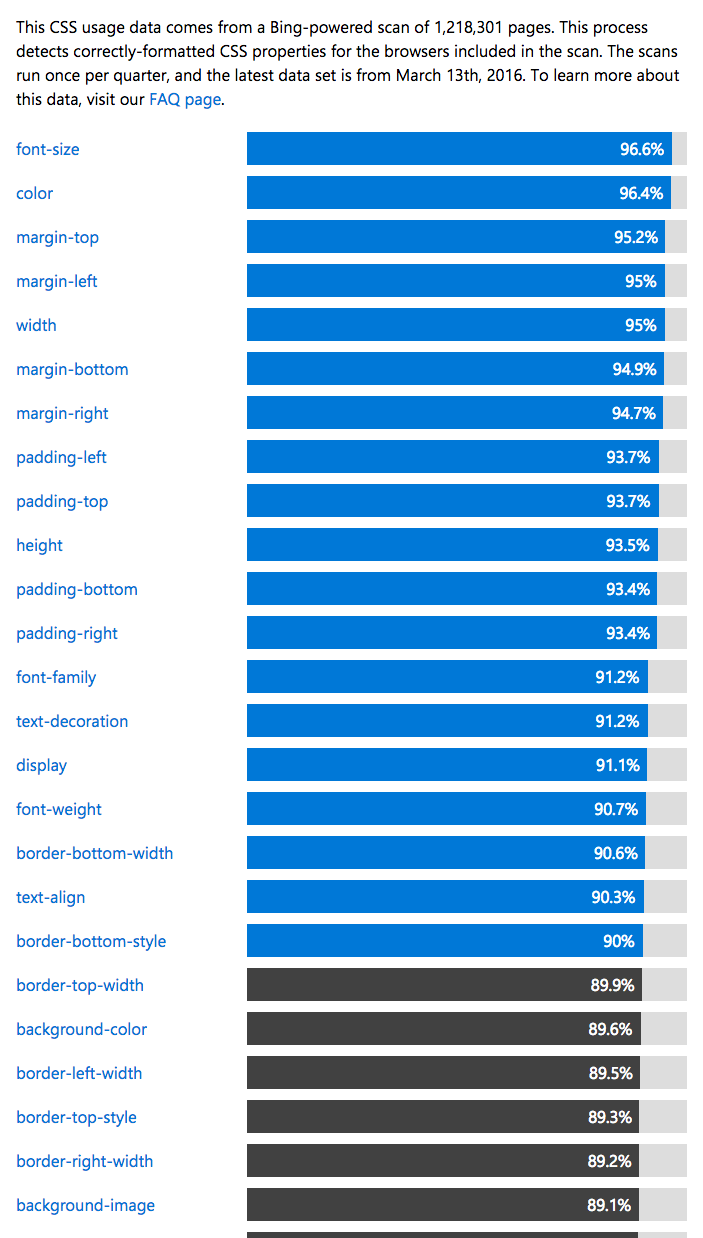
https://developer.microsoft.com/en-us/microsoft-edge/platform/usage/
To study efficiently among the enormous amount of CSS, I recommend learning the frequently-used code first, through indicators like this.
The code below is code that, when you drag, changes the text's shadow and background color. It's made using the pseudo-selector ::selection. This is the code that makes text turn purple when you drag it on this site right now. Also, the button below is made using the pseudo-selector :hover so that a box-shadow appears when you hover the mouse over it.
See the Pen by nabomhalang (@nabomhalang) on CodePen.
As above, using pseudo-selectors well lets you decorate things very prettily. To show more pretty CSS as examples,
See the Pen CSS 3D Blend Mode Buttons by Lisi (@lisilinhart) on CodePen.
See the Pen wallet - icon animation by Mike Aparicio (@peruvianidol) on CodePen.
You can make code like the above without JS.
If you want to browse even prettier buttons, visit https://freefrontend.com/css-buttons/.
Since the most eye-catching thing on a website is the design (CSS), I think CSS is extremely important. I hope you master it well.
Original (Korean): tistory — published 2021-06-27, migrated to this blog. This translation was generated with the help of AI.
…