AWS cloud service logs
- Per-resource logs
- EC2 create/delete, S3 storage logs, database logs, serverless resource logs, container logs, and more...
- Each resource can be checked and aggregated with CloudWatch.
- With the CloudWatch agent you can extend EC2 logs for integrated analysis.
- Network traffic logs
- VPC Flow logs for virtual networks
- Create and manage flow logs per VPC
- Resource event logs
- Manage API logs from the AWS SDK and CLI
- Track the IP address and user account that called the API
- Billing event logs
- Check costs per resource/tag while using cloud services
- Warning emails when usage exceeds a set budget
What is AWS CloudWatch?
- Amazon CloudWatch monitors Amazon Web Services (AWS) resources and applications running on AWS in real time. You can use CloudWatch to collect and track metrics — measurable variables for your resources and applications.
- The CloudWatch home page automatically shows metrics for every AWS service in use. You can create custom dashboards to display metrics for your own applications, or show custom collections of chosen metrics.
- You can create alarms that watch metrics and send notifications, or automatically change monitored resources when a threshold is breached. For example, you can monitor an EC2 instance's CPU usage and disk reads/writes, then use that data to decide whether to launch additional instances to handle increased load — or stop under-utilized instances.
- With CloudWatch you get system-wide visibility into resource utilization, application performance, and operational health.
Using AWS CloudWatch
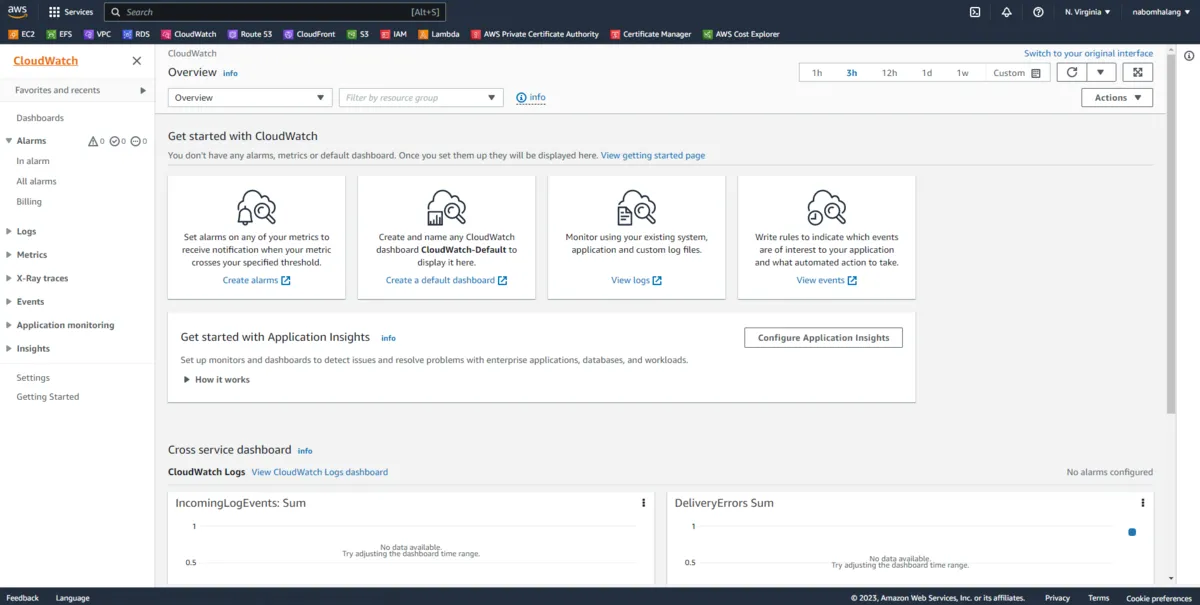
This is the AWS CloudWatch main screen, where you can configure all kinds of logging. Let's set up a budget alarm under Alarms → Billing.
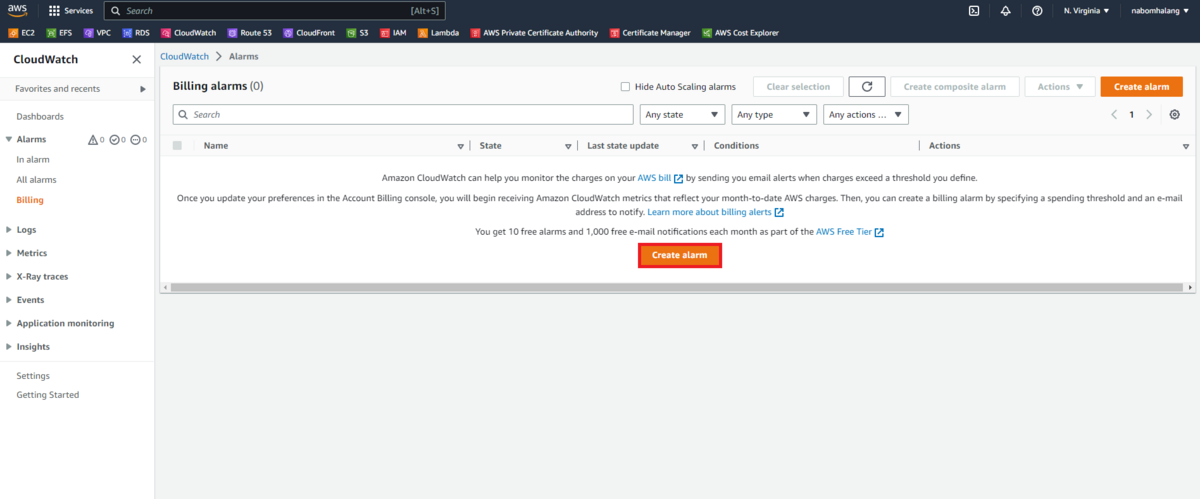
Click Create alarm to create one.
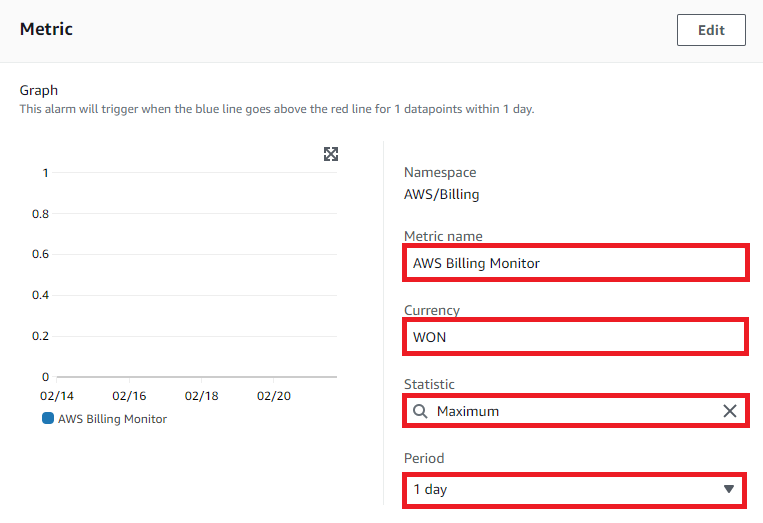
Metric name is the name, Currency is the currency, Statistic is the aggregation, and Period is the interval. Setting the period too short increases your CloudWatch bill, so pick something reasonable.
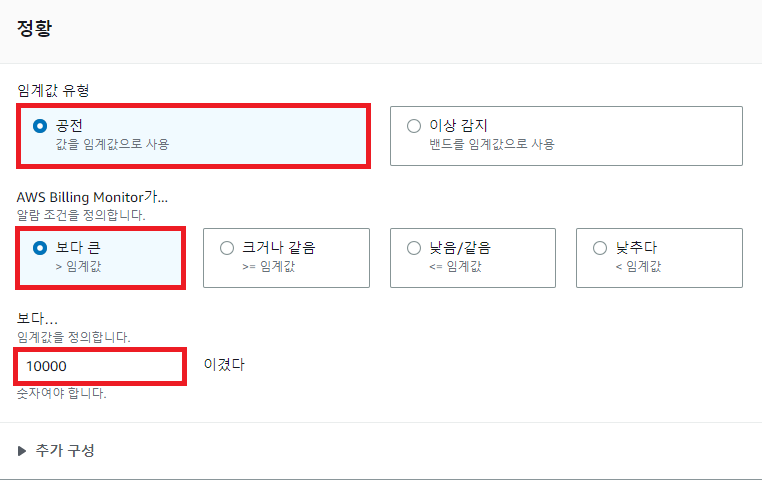
I translated the screen to Korean for readability. You set a threshold for spend and choose whether to alarm when the value is above or below it.
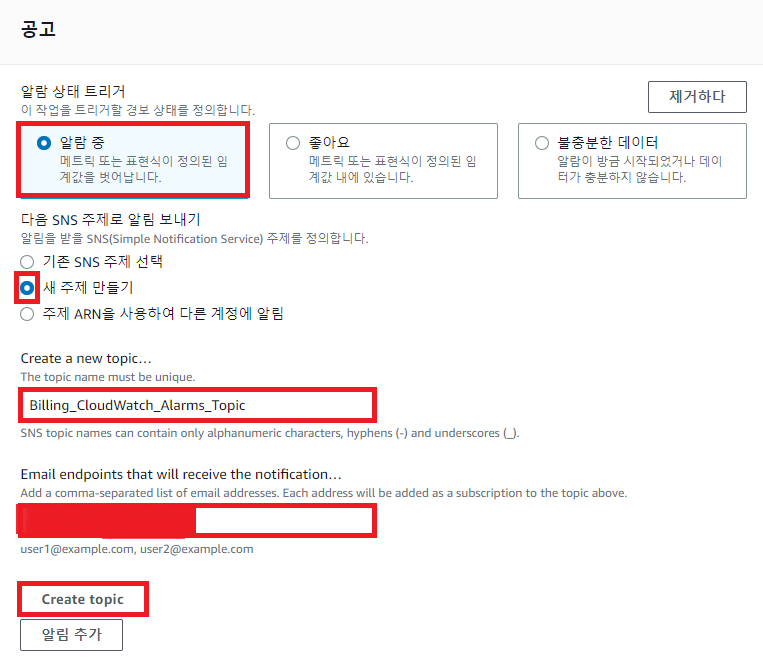
Select the alarm, click Create new topic, name the topic, enter the email address to notify, and press Create topic. Next time you need the same topic you can reuse the name you entered.
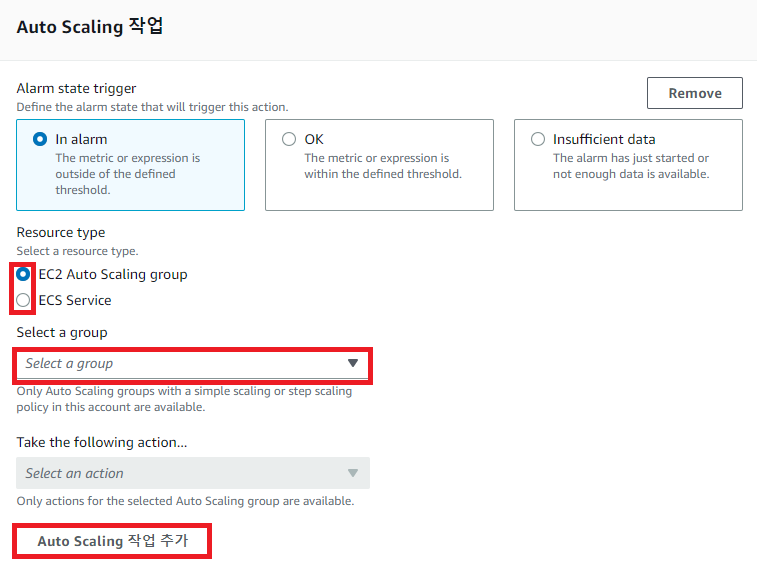
This section configures alarm states for costs going up and down during auto-scaling (not used in this exercise). Keep clicking next, and just fill in the name and description at the end.

It was created successfully. Since I set a one-day period, it shows Insufficient data until a day passes and data accumulates. That's it for AWS CloudWatch.
What is AWS CloudTrail?
AWS CloudTrail is an AWS service that helps enable operational and risk auditing, governance, and compliance for your AWS account. Actions performed by users, roles, or AWS services are recorded as events in CloudTrail — including actions in the AWS Management Console, AWS CLI, and AWS SDKs/APIs.
AWS CloudTrail overview
- A service that supports account management, compliance, and operational/risk auditing
- Review recorded information about actions performed by users, roles, and services
- Collect events for every activity across AWS for analysis, resource change tracking, and more
AWS CloudTrail event types
- Management events: information about management operations performed on account resources
- Data events: information about resource operations performed on resources
- Insights events: records of unusual activity in the account
How AWS CloudTrail works
AWS CloudTrail is enabled on your AWS account when it is created. Activity in the account is recorded as CloudTrail events, and you can review them in Event History in the AWS Console.
AWS CloudTrail can be configured to store events in an S3 bucket you specify. You can also deliver and analyze trail events through AWS CloudWatch Logs and Events.
- A trail that applies to all regions
- With an all-region trail, CloudTrail records events in each region and delivers the log files to your chosen S3 bucket. When a new region is added, it is automatically included and logged.
- A trail that applies to one region
- With a single-region trail, CloudTrail records events only in that region and then delivers the log files to the specified S3 bucket.
By default CloudTrail log files are encrypted with S3 SSE (server-side encryption). Optionally you can encrypt them with an AWS Key Management Service (AWS KMS) key.
CloudTrail workflow
Review event history for the account
- In the CloudTrail console or via the AWS CLI, you can view and search events recorded over the last 90 days.
Download events
- You can download a CSV or JSON file containing up to the last 90 days of CloudTrail events for the account.
Download saved query results
- You can download a CSV file containing saved CloudTrail Lake query results.
Create a trail
- CloudTrail can deliver log files to an Amazon S3 bucket using a trail.
- A trail created in the console applies to all regions by default.
- The trail logs events from every region in the AWS partition and delivers log files to the specified S3 bucket.
Create and subscribe to an Amazon SNS topic
- Subscribing to the topic lets you receive notifications when log files are delivered to the bucket.
- Amazon SNS can notify you in several ways, including programmatically via Amazon Simple Queue Service.
View log files
- You can retrieve log files using Amazon S3.
Manage user permissions
- With AWS Identity and Access Management (IAM) you can manage which users may create, configure, or delete trails, start and stop logging, and access the S3 bucket containing log files.
Monitor events with CloudWatch Logs
- You can configure a trail to send events to CloudWatch Logs.
- With CloudWatch Logs you can monitor whether specific API calls and events occurred in the account.
Log management events and data events
- Configure the trail to log read-only, write-only, or all management and data events.
Log encryption & integrity validation
- Log file encryption adds another layer of security to log files.
- Log file integrity validation lets you verify that files were not modified after CloudTrail delivered them.
Enable CloudTrail Lake
- CloudTrail Lake lets you run fine-grained SQL-based queries over events.
- Events are aggregated into an event data store — an immutable collection of events based on criteria you choose via advanced event selectors.
- Event data can be retained in the event data store for up to seven years.
- CloudTrail Lake is part of an auditing solution that helps with security investigations and troubleshooting.
Copy trail events into CloudTrail Lake
- You can copy existing trail events into a CloudTrail Lake event data store to create a point-in-time snapshot of events recorded by the trail.
Save CloudTrail Lake query results to an S3 bucket
- When running a query you can save the results to an S3 bucket.
Share log files with other AWS accounts
- Log files can be shared across accounts.
Aggregate logs from multiple accounts
- Log files from multiple accounts can be aggregated into a single bucket.
What is a trail?
Trail
is a configuration that can deliver CloudTrail events to an Amazon S3 bucket, CloudWatch Logs, and CloudWatch Events. With a trail you can filter which CloudTrail events to deliver, encrypt CloudTrail event log files with an AWS KMS key, and set up Amazon SNS notifications for file delivery.
CloudTrail practice
Let's practice with CloudTrail briefly.
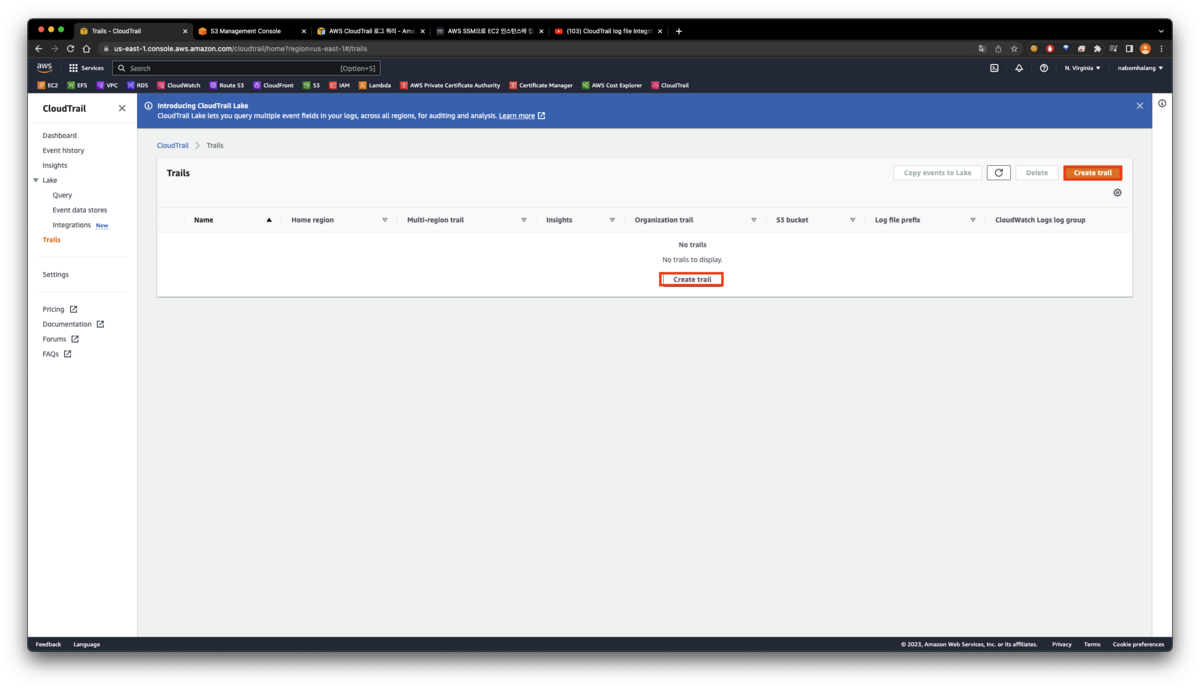
As in the picture above, go to CloudTrail → Trails and click Create trail.
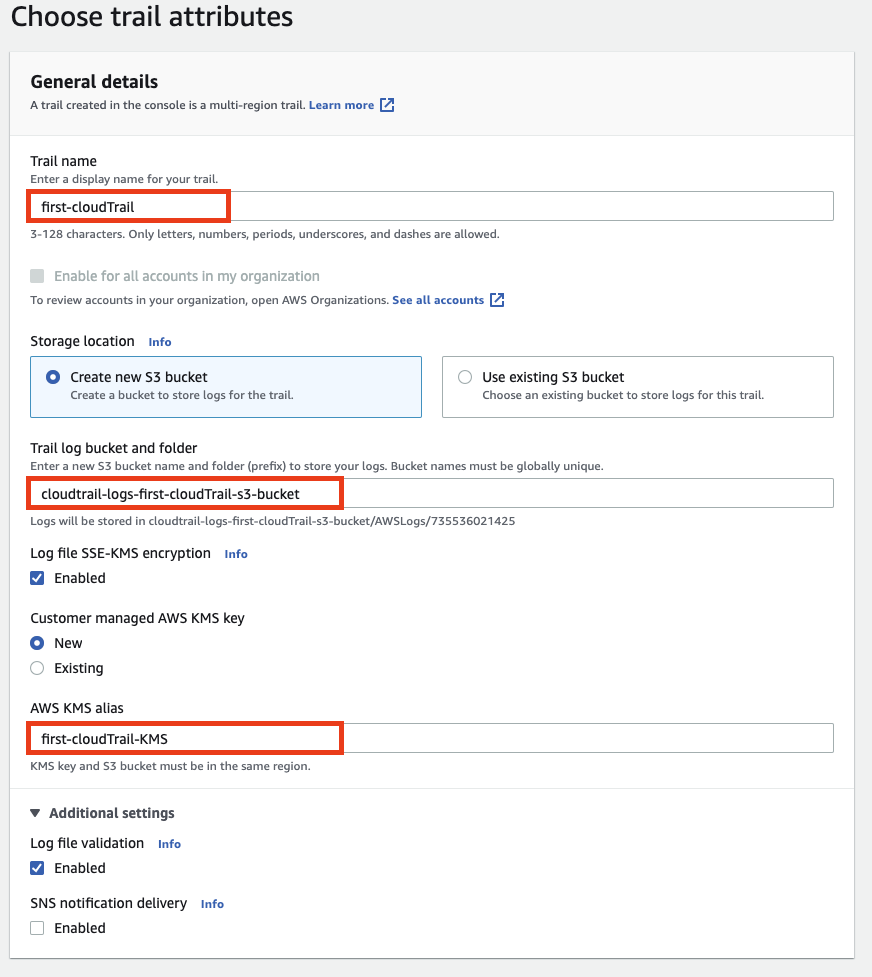
As explained earlier, CloudTrail stores events from a region in an S3 bucket — this step creates the bucket it will use. I'll cover Log file validation separately later. The CloudWatch Logs option below asks whether to also log this trail to CloudWatch. Keep clicking next and Create trail.
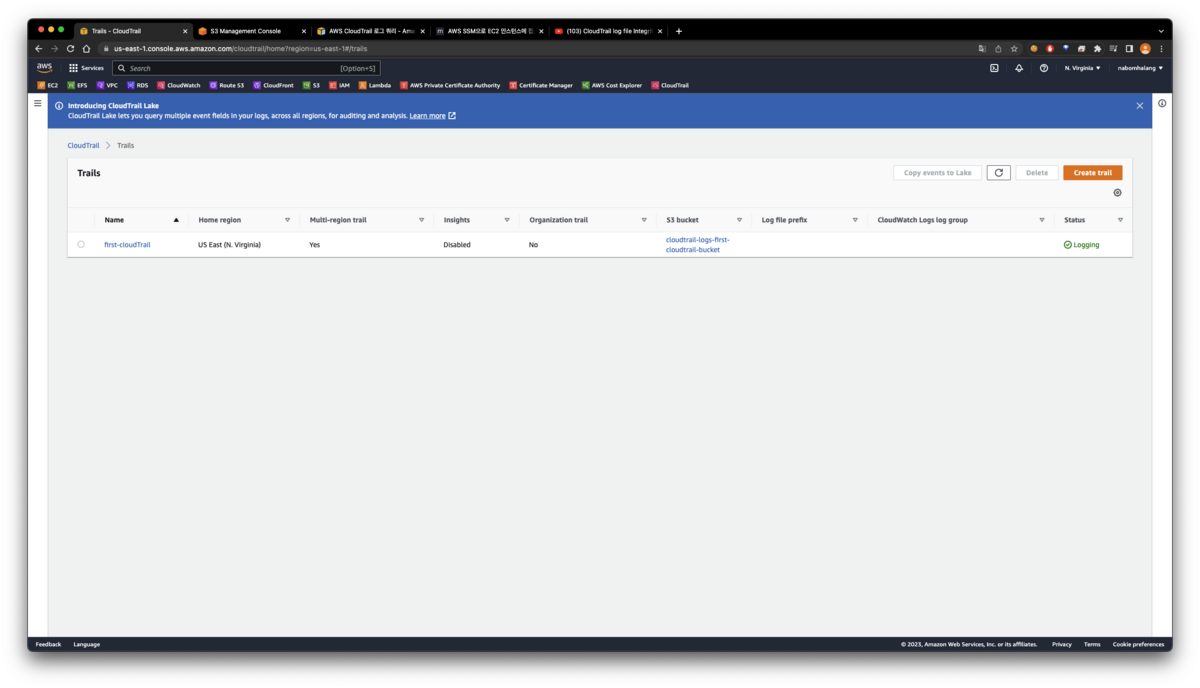
You can confirm it was created successfully, and if you visit S3 you'll see the new bucket.
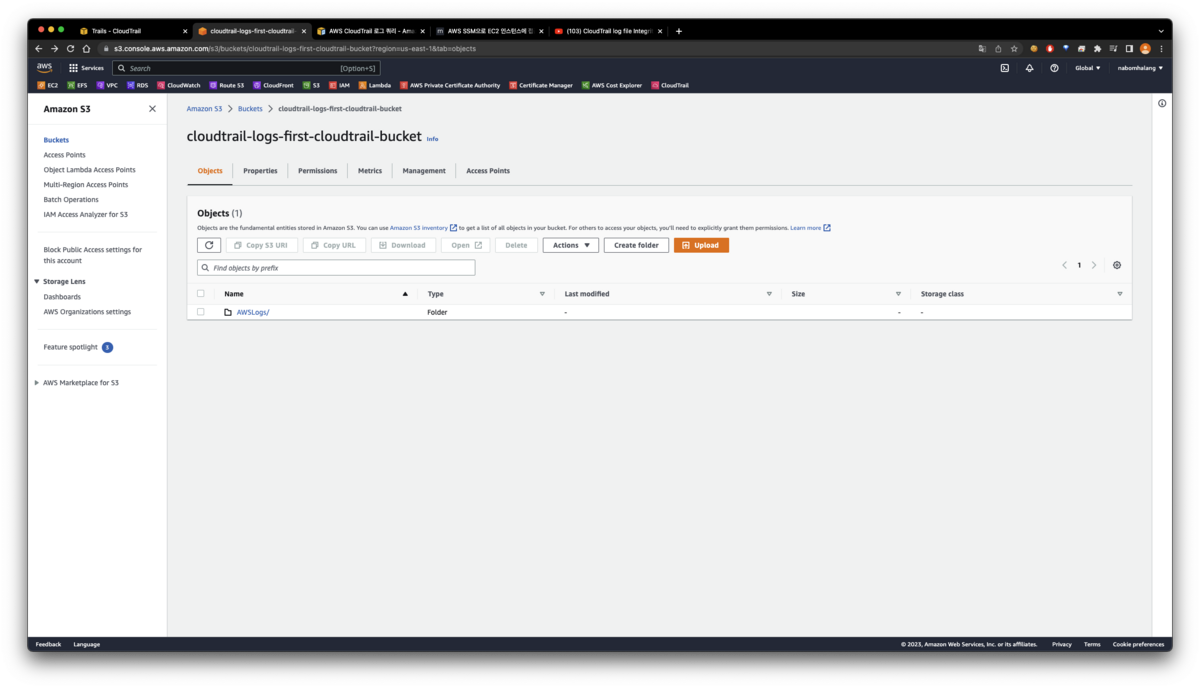
An AWSLogs folder holding the logs was created, and the logs are being written correctly inside it.
Original (Korean): tistory — published 2023-02-22, migrated to this blog. This translation was generated with the help of AI.