cryptography
symmetric key: DES, 3DES, AES — the encryption/decryption keys are the same
asymmetric key: DH (Key Exchange Protocol), RSA (needs a CA) — the encryption/decryption keys differ
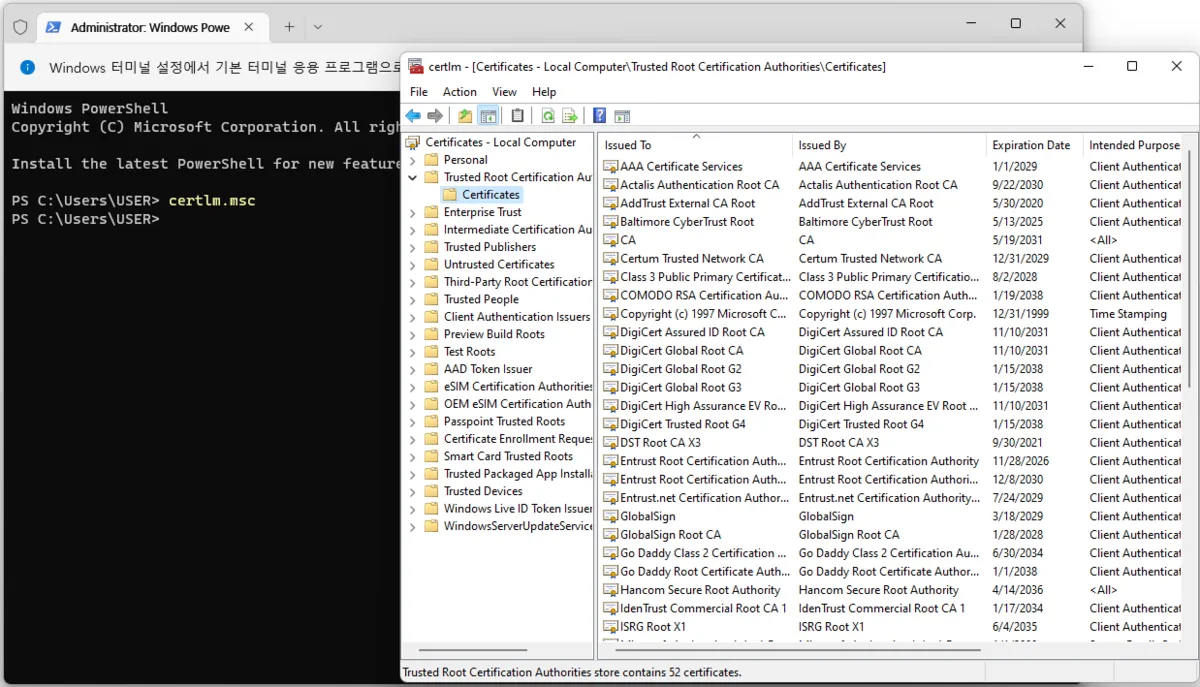
In PowerShell, enter certlm.msc and check Certificates
You can see the certificate documents Windows actually holds.
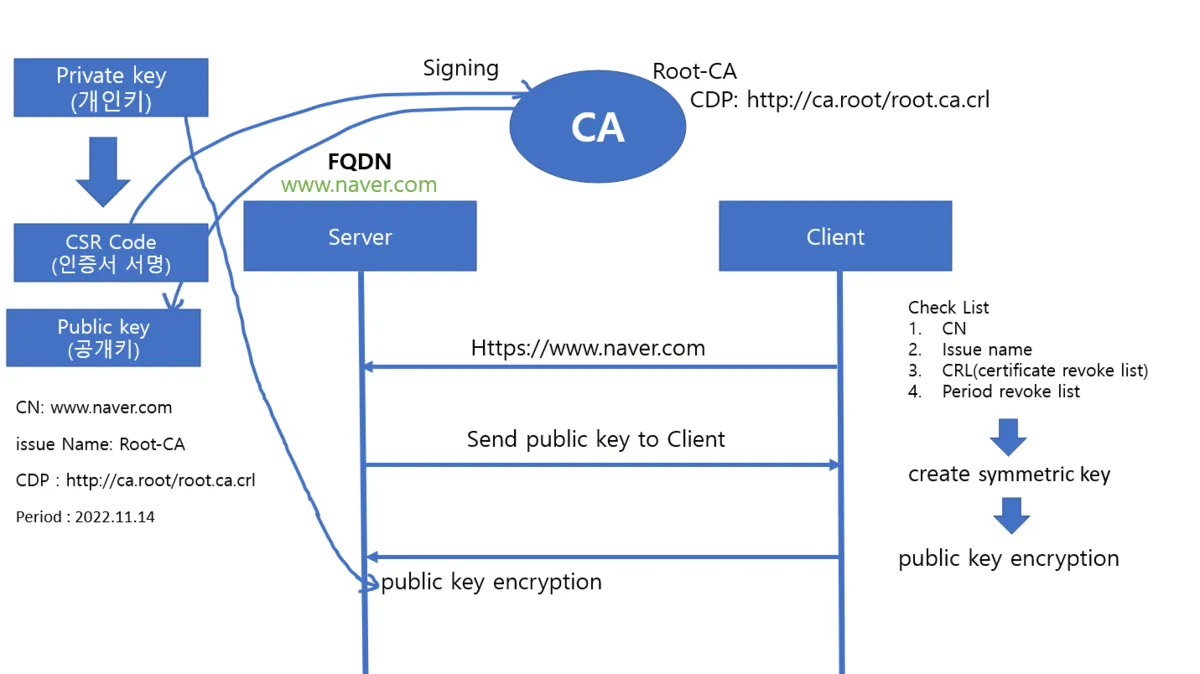
The Certificates process
Issuer Name
The issuer name means and includes the name of the issuer or its affiliates, or the members, administrators, or any trade names, trademarks, logos, and services of those affiliates. It includes, but is not limited to, symbols or abbreviations, reductions or simulations owned or used by the issuer or its affiliates, and the name of the issuer's site.
CDP
A URL-format location where the issuing CA's base certificate revocation list (CRL) is published. When revocation checking is enabled, the application uses the URL to retrieve an updated version of the CRL. The URL can use HTTP (Hypertext Transfer Protocol) or LDAP.
With the help of the CDP, an application or site visitor can retrieve the certificate revocation list (CRL) to decide whether a digital certificate can be trusted.
GRE (Generic Routing Encapsulation)
A tunneling protocol that makes a remote network appear as if it were a local network — designed to enable encapsulation of arbitrary layer protocols so they can be routed.
Characteristics
Site-to-Site IP tunneling protocol: a protocol originally developed by Cisco
Provides no data encryption: to secure it, you must additionally apply IPsec features.
Protocols that can be carried inside the tunnel: layer-3 (IPv4, IPv6, IPX, IPSec), layer-2 frames, and more — quite varied
To create a GRE tunnel, you must set up a virtual serial link interface in advance between 2 or more endpoint routers.
It attaches a GRE header to the original packet and delivers this packet over a pre-configured virtual link between 2 or more routers, treated as if the routers were end-to-end HDLC-encapsulated.
GRE tunneling categories
1. Point to Point
2. Multipoint
About GRE tunneling
The traditional implementation of GRE tunnels involved point-to-point tunnel configurations traveling between two sites. This type of configuration works well when this is the behavior and the number of tunnels to configure is limited. But when there are a large number of spoke sites, the hub router's configuration and the number of independent IP address ranges can become excessive rather quickly.
By default IPv4's MTU is 1500 bytes. Of that, the header is 20 bytes, and the GRE header gets added afterward. That makes it 1524 bytes total, and this packet gets fragmented. Since that shouldn't happen, you send 1476 bytes from the start — subtracting the later 24 bytes up front.
IPSec VPN
0. IPSec VPN configuration flow
- Define the traffic targeted for the VPN using an ACL.
- Define the IKE policy for specifying the SA parameter values.
- Configure authentication-related settings (shared key, password, IP address).
- Define the Transform-set for IPSec communication.
- Define the IPSec policy.
- Apply the IPSec policy to the interface.
1. Define the traffic targeted for the VPN using an ACL.
Using an Extended ACL, you must designate the traffic that will use the IPSec VPN over the public network.
Router(config)# access-list [number] [permit | deny] [protocol] [Source] [source wildcard-mask] [destination] [destination whildcard-mask]
In a VPN you must use Permit!
2. Define the traffic targeted for the VPN using an ACL.
Defining the ISAKMP SA (IKE 1) policy
Configure the parameters for ISAKMP SA (IKE 1) encryption and authentication. Configuration is done by entering 'config-isakmp' mode as follows.
Router(config)# crypto isakmp policy [policy number 1~10000]
3. Defining each parameter
- Authentication method
- Encryption algorithm
- Diffie-Hellman group
- Hash algorithm
- Lifetime
- Authentication settings (related to the shared secret key and IP address)
4. Authentication method
Authentication methods include the public-key method and the shared-secret-key method. The default is 'rsa-sig'.
Router(config)# authentication [pre-share | rsa-encr | rsa-sig]
5. Encryption algorithm
Specify the encryption algorithm. The default is 'des'.
Router(config)# encryption [3des | aes | des]
6. Diffie-Hellman group
Select the 'Diffie-Hellman' group for securely sending and receiving the secret key. The default is 'group 1'.
The larger the number, the higher the encryption strength, but the overhead increases.
Router(config-isakmp)# group [1 | 2 | 5 | 14 ...]
7. Hash algorithm
Specify the authentication algorithm; you can choose 'md5' or 'sha'. The default is 'sha'.
Router(config-isakmp)# hash [md5 | sha ...]
8. Lifetime
Using an SA for a long time is a security weakness, so specify a lifetime so it can be renewed at appropriate intervals. The default is 86400 seconds (1 day).
Router(config-isakmp)# lifetime [60~86400 second]
Set the shared key (password) and IP address used in common between the mutual routers.
Router(config)# crypto isakmp key [password] address [destination ipv4 address]
Here, specify the password identically to the peer's.
In the Transform-set you define AH and ESP, and the user specifies the authentication protocol and cipher algorithm. You also specify the IPSec communication mode.
Router(config)# crypto ipsec transform-set TS esp-3aes esp-sha-hmac
11. Defining the IPSec mode
Specify the IPSec communication mode. The mode can be specified as transport mode or tunnel mode as follows. The default is tunnel mode.
Router(cfg-crypto-trans)# mode [transport | tunnel]
12. Define the IPSec policy.
Perform the IPSEC SA (IKE 2) configuration. Once configuration is complete, apply it to the interface.
Defining the crypto map
Router(config)# crypto map [name: string] [number: 1~65535] jipsec-isakmp
13. Specify the IPSec peer router's IP address
Router(config-crypto-map)# set peer [hostname | ip address]
Router(config-crypto-map)# set transform-set [transform-set name]
15. Specify the IPSec SA lifetime
Specify the IPSec SA lifetime. It can be specified in kilobytes of packets used, or in seconds. Whichever condition is met first is applied. The defaults are '4.6 gigabytes' and '3600 seconds (1 hour)'.
Router(config-crypto-map)# set security-association lifetime [kilobytes | seconds]
16. Apply the IPSec policy to the interface.
Apply the configured IPSec policy to the interface in the following way.
Router(config)# interface [interface name]
Router(config-if)# crypto map [crypto map name]
Original (Korean): tistory — published 2022-11-14, migrated to this blog. This translation was generated with the help of AI.