Topology

Topology
Configuration
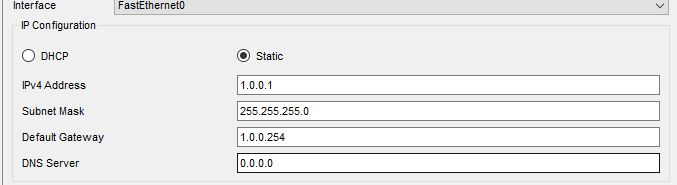
pc1 config
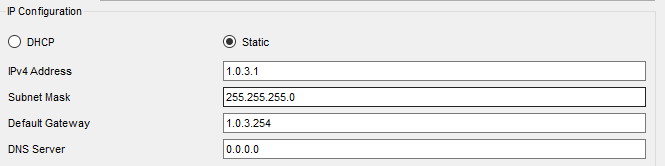
pc2
Router(config)#int g0/0
Router(config-if)#ip add 1.0.0.254 255.255.255.0
Router(config-if)#no shut
Router(config-if)#int se0/0/0
Router(config-if)#ip add 200.0.0.1 255.255.255.0
Router(config-if)#no shut
This is the (left) Router2's config. Set just a plain IP, and then we'll do the RIP config.
Router(config)#int g0/0
Router(config-if)#ip add 1.0.3.254 255.255.255.0
Router(config-if)#no shut
Router(config-if)#int se0/0/1
Router(config-if)#ip add 200.0.0.2 255.255.255.0
Router(config-if)#no shut
This is the (right) Router2(1) config.
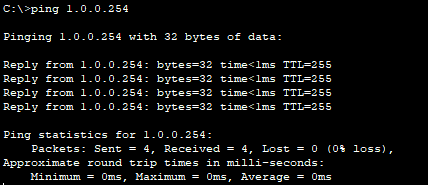
pc1 → (left) router2
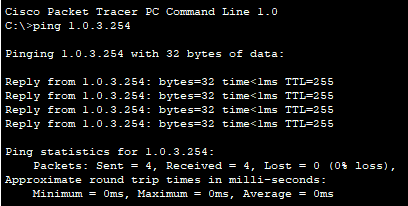
pc2 → (right) Router2(1)
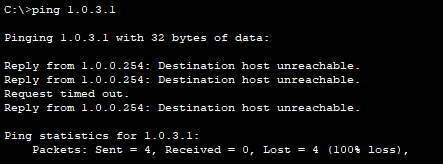
pc1 → pc2
Within each network zone the ping goes through fine, but between the PCs it doesn't. This happens because the network zones differ, so you have to connect them via routing. Here we'll use dynamic routing (RIP).
Dynamic routing (RIP)
There are many kinds of routing protocols, and one of them is RIP. RIP is very easy to configure and, being standardized, is highly compatible regardless of the router model. But it has the drawback that it only works between Cisco devices.
There are techniques to prevent the infinite loops that occur in RIP.
- Split Horizon: it doesn't send a routing update about a network back toward where it received that network's info.
- Poison Reverse: a feature where, on receiving a hop routing value of 16, it conversely tells that the router is broken.
- Triggered Update: it immediately informs neighboring routers of a change in the topology.
There are others too. Having these doesn't mean loop prevention is completely achieved.
RIPv2
When RIP conveys routing info, it doesn't give the subnet mask info and follows the classful method. Depending on what the leading 8 bits are, the subnet mask is decided automatically, which can cause problems. To solve this problem we use RIPv2. RIPv2 gives the subnet mask info along with it so you can use the classless method, so when advertised with an A-class subnet it can distinguish the same network as a different network.
Router(config)#route rip
Router(config-router)#no auto-summary
Router(config-router)#version 2
Router(config-router)#net 200.0.0.0
Router(config-router)#net 1.0.0.0
This is the (left) Router2 RIPv2 config.
Router(config)#route rip
Router(config-router)#version 2
Router(config-router)#no auto-summary
Router(config-router)#network 1.0.0.0
Router(config-router)#net 200.0.0.0
This is the (right) Router2(1) RIPv2 config.
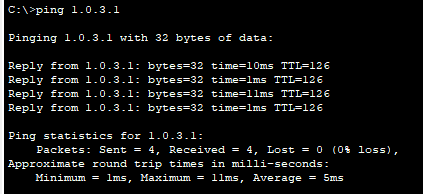
pc1 → pc2
Now you can see the ping goes through fine.
Analysis
Let's send a ping from PC1 → PC2 and check it with the simulation.
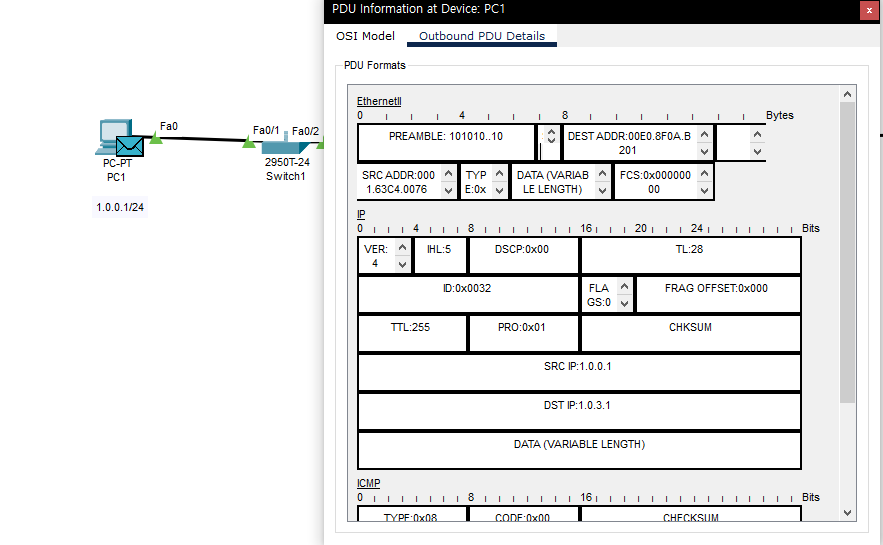
Checking the PDU at PC1
Since it starts at the PC, only Outbound exists. You can see the SRC (source) IP is 1.0.0.1 and the DST (destination) IP is 1.0.3.1. Checking Ethernet2, there are DEST ADDR and SRC ADDR here too — these are the MAC addresses. But the difference from IP is that the starting-point SRC matches PC1's MAC address.
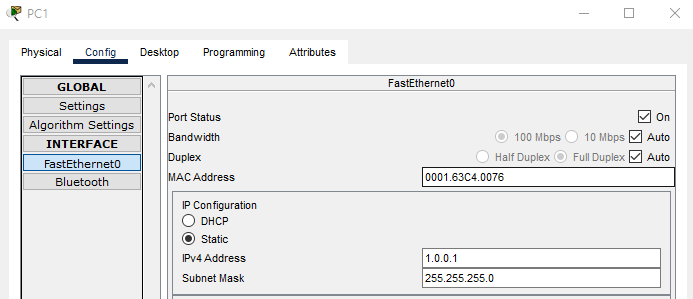
PC1's MAC address
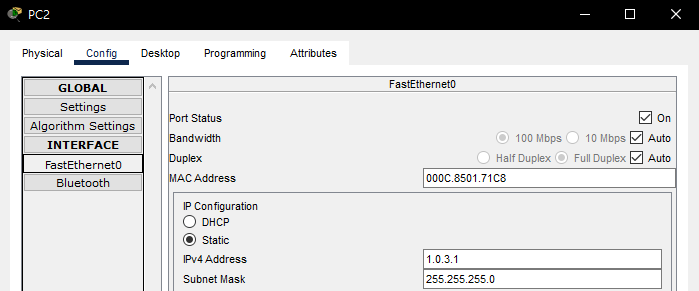
PC2's MAC address
You can see the DEST ADDR differs from PC2's MAC address. So whose MAC is that?
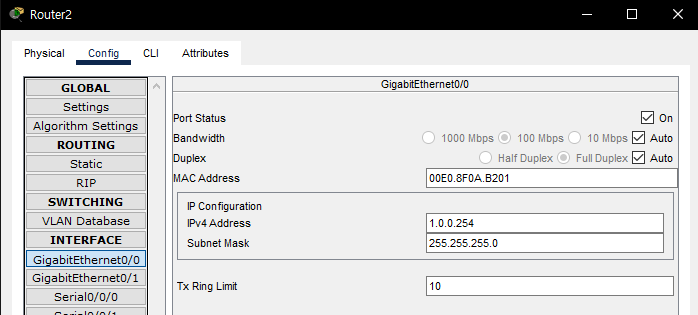
(left) Router2's MAC address
You can see it matches the (left) Router2's MAC address. So the first destination of this ping can be seen as the (left) Router2.
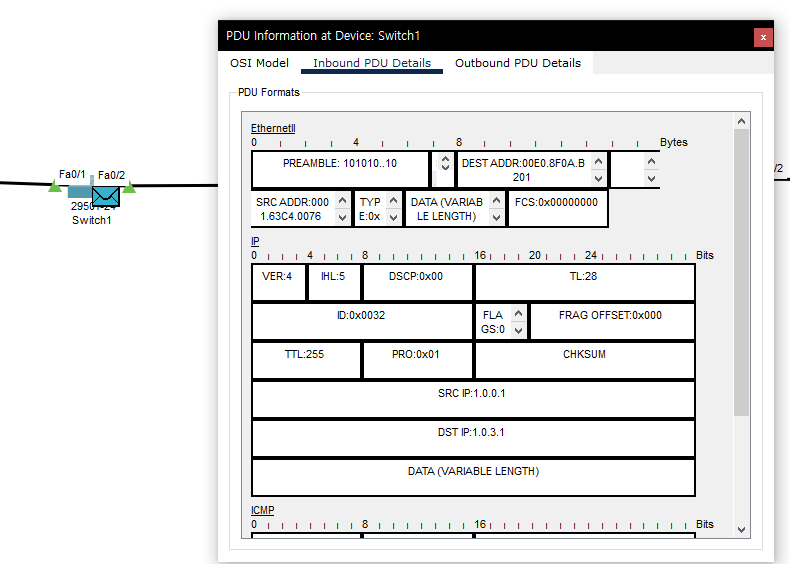
The switch's PDU
This is the switch. Inbound and Outbound exist. The IP looks the same and Ethernet2 looks the same too. A switch is a communication device connecting network units at a larger scope of the packet. That's why Inbound and Outbound are bound to be the same.
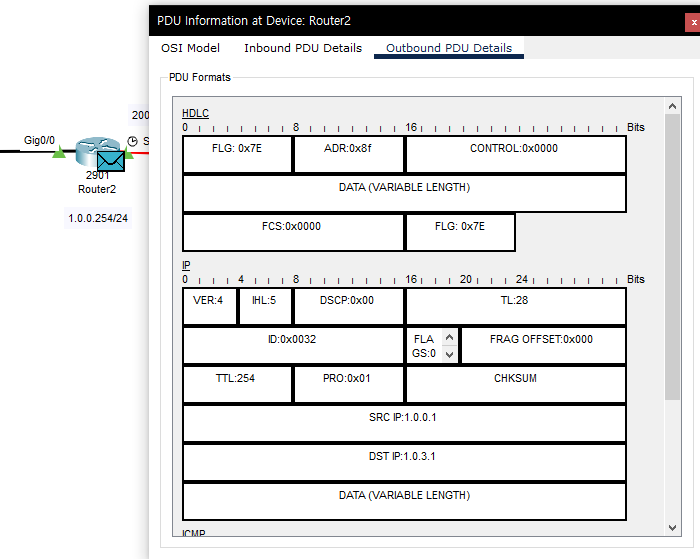
The (left) router's Outbound PDU
The IP would be the same, but in Ethernet2 it changed to HDLC. The only port to exit the router is the serial 0/0/0 port.
What is HDLC?
HDLC is the High-level Data Link Control protocol, providing data send/receive functionality in an environment where computers are connected one-to-one or one-to-many.
Hosts using the HDLC protocol can be divided into 3 forms. They're split into Primary Station, Secondary Station, and Combined Station: the primary station is the host that transmits commands. The secondary station is the host that returns responses to commands, and the combined station is a host that has both primary and secondary functions.
The frame structure using the HDLC protocol uses a bit-frame method. A flag (01111110) marking the start and end of the frame is used.
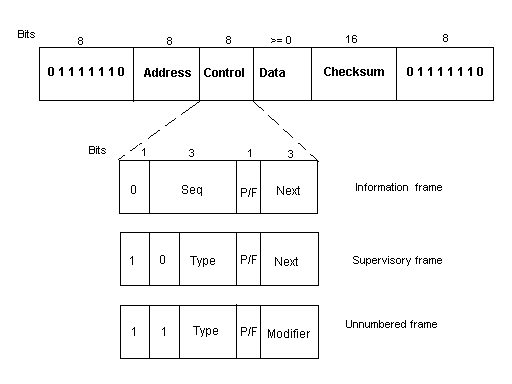
Source: https://copycode.tistory.com/79
Looking at the router above too, there's a FLAG: 0x7E at the very start and very end, which is likewise 01111110 in binary.
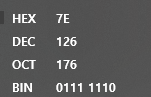
0x7E
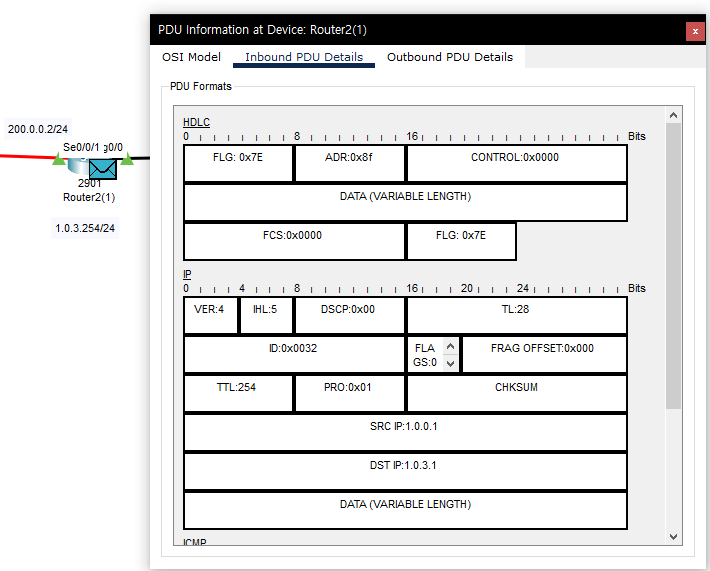
(right) Router2(1) Inbound PDU
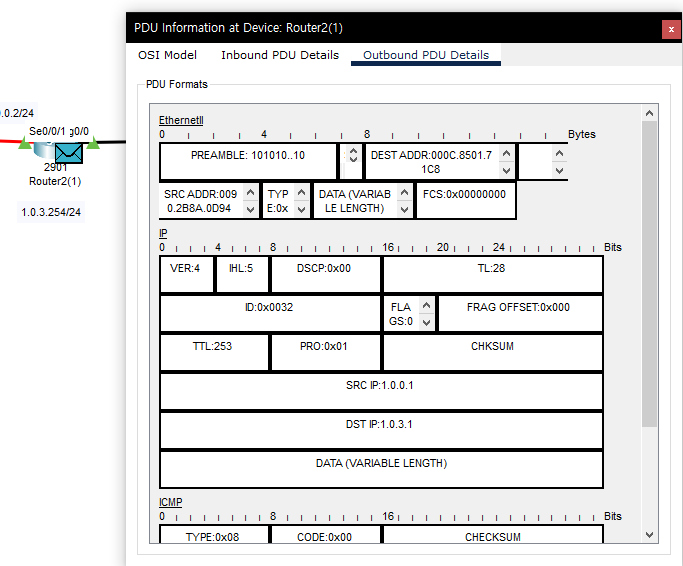
(right) Router2(1) Outbound PDU
Now at Outbound it changed back to Ethernet2. The SRC ADDR is naturally this router's MAC, and now you can confirm the DEST ADDR is PC2's MAC address. After that it likewise passes through the switch and moves to PC2.
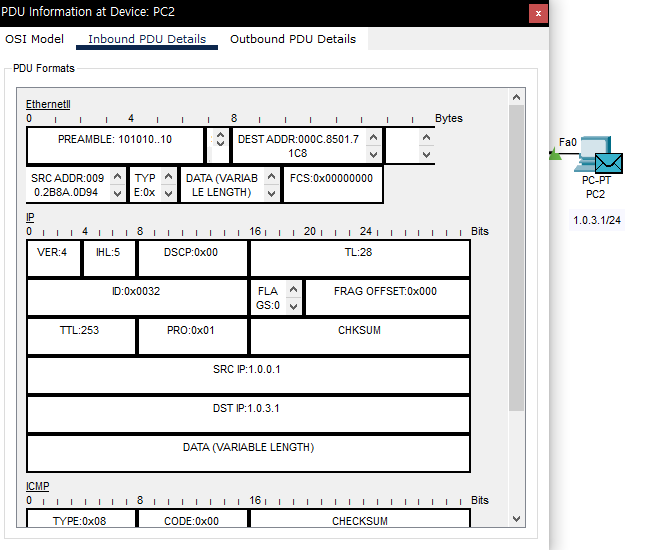
The Inbound PDU at PC2
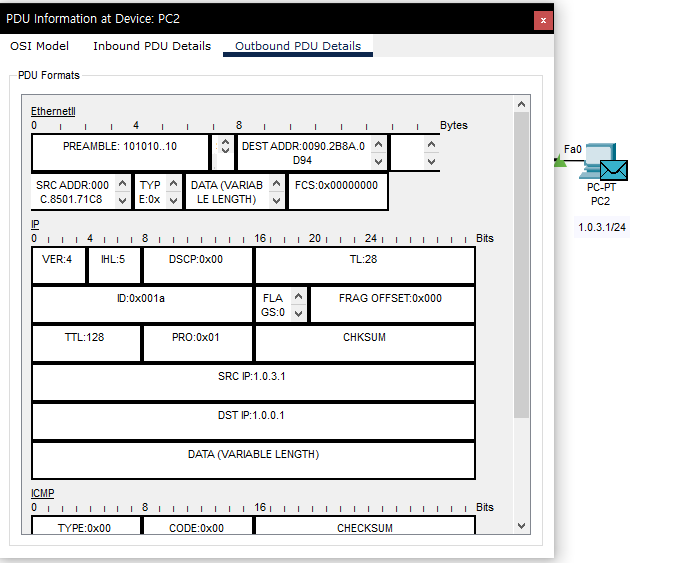
PC2's Outbound PDU
On Inbound the transmission from PC1 to PC2 completes, and then it'll be transmitted from PC2 back to PC1. Looking at Outbound, you can see the SRC IP and DST IP are swapped. This means it'll transmit back to PC1. Accordingly you can see the DEST ADDR and SRC ADDR swapped. When it comes back to PC1 in this form, PC1's terminal will show the ping arrived successfully.
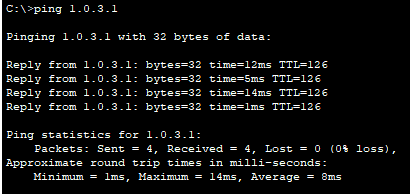
Ping arrival at PC1
Conclusion
When PCs on different networks communicate, you can see the starting point is the current source's MAC address, and the destination is not where the ping is sent but the MAC address of the router in between. Moving through the router, at the router again its own starting point becomes its MAC address, and now that there's a PC holding the destination IP in the same network range, that PC's MAC becomes the destination.
I checked how, while keeping the source IP and destination IP in the PDU's IP, the Ethernet2's request changes. It felt kind of fascinating. It was my first time using the simulation.
Below is the Packet Tracer file I practiced with. (version: 8.1.1)
[
rip.pkt
0.05MB
](https://blog.kakaocdn.net/dna/dYAA0G/btrseQwVhzL/AAAAAAAAAAAAAAAAAAAAAE2oUCwIns3VdSyvkYz3HOrDlYoWG2IU0x9sUKLGyHQb/rip.pkt?credential=yqXZFxpELC7KVnFOS48ylbz2pIh7yKj8&expires=1790780399&allow_ip=&allow_referer=&signature=Qbfw%2FSa1yEttgIZPAWKND9QKGYA%3D&attach=1&knm=tfile.pkt)
Original (Korean): tistory — published 2022-02-02, migrated to this blog. This translation was generated with the help of AI.