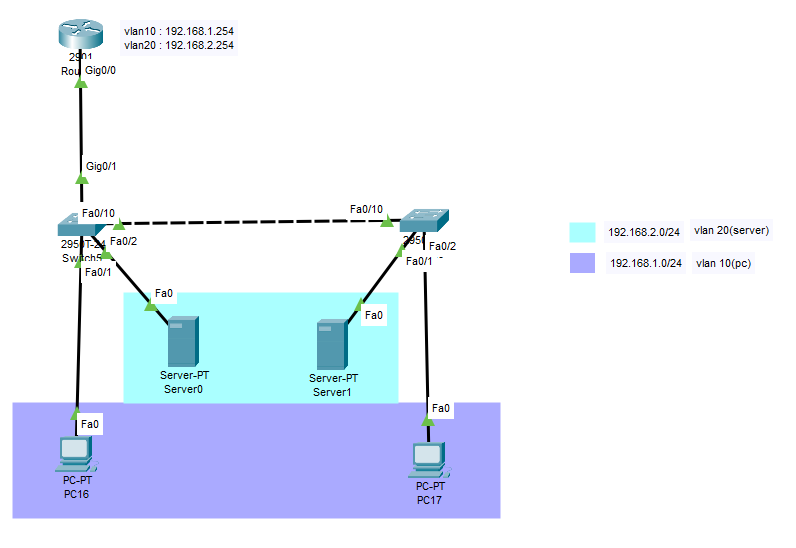
Topology
What is a VLAN (Inter-VLAN)?
It's a feature that separates each switch port into a different network.
Using VLANs splits the broadcast domain, preventing the switch's network from growing too large and reducing the load the switch has to handle. As the network configuration changes, the administrator can respond simply through config operations.
What is a port? It refers to a VLAN-applied switch port. Port types are Access / Trunk.
- Access Port: a port included in only a single VLAN. It can communicate with other ports in the same VLAN but not with ports in a different VLAN. By default it should be configured as an Access Port.
- Trunk Port: a method designating one port so that many VLANs' frames can pass through. Unlike an Access port, it belongs to no VLAN.
So even within the same network range, if the VLANs differ, communication fails. Therefore, doing routing between VLANs makes communication between different VLANs possible. This is called Inter-VLAN. Now looking at the topology above, Switch1 has a PC and a server, and those two devices are on different VLANs so they can't communicate. But once you route, communication becomes possible.
Configuration
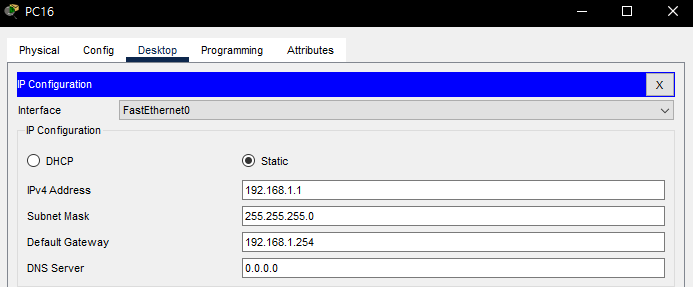
pc16 config
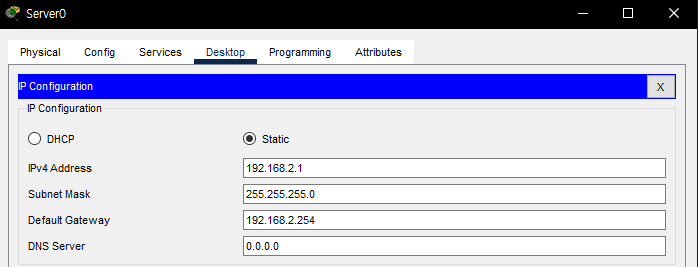
server0 config
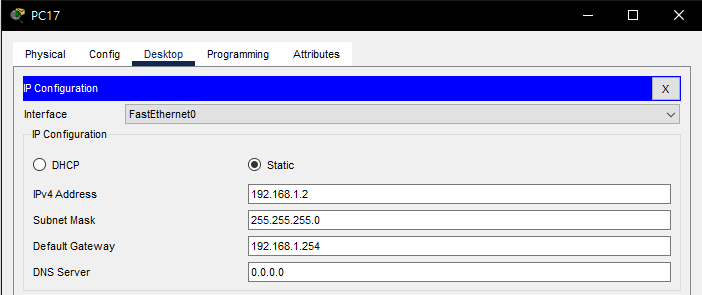
pc17 config
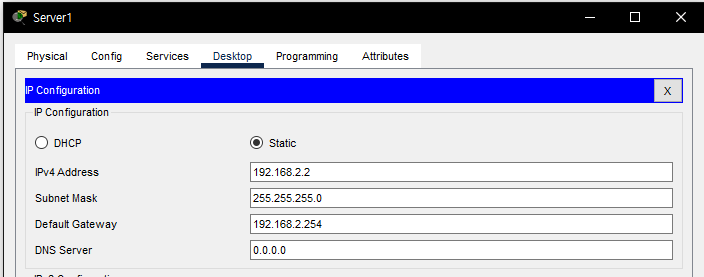
server1 config
Switch(config)#vlan 10
Switch(config-vlan)#name pc
Switch(config-vlan)#ex
Switch(config)#vlan 20
Switch(config-vlan)#name server
Switch(config-vlan)#ex
Switch(config)#int fa0/1
Switch(config-if)#switchport mode access
Switch(config-if)#switchport access vlan 10
Switch(config-if)#int fa0/2
Switch(config-if)#switchport mode access
Switch(config-if)#switchport access vlan 20
Switch(config)#int fa0/10
Switch(config-if)#switchport mode trunk
Switch(config-if)#switchport trunk allowed vlan all
Switch(config-if)#int g0/1
Switch(config-if)#switchport mode trunk
Switch(config-if)#switchport trunk allowed vlan all
Switch(config)#do wr
This is the left switch's config. Create VLANs 10 and 20, name them as written in the topology, and set fa0/1 to vlan10 and fa0/2 to vlan20. And the port that moves to another switch or router must be set as trunk so the VLANs can move freely. Configure the right switch the same way as above.
Switch(config-if)#do sh vlan
VLAN Name                             Status    Ports
---- -------------------------------- --------- -------------------------------
1    default                          active    Fa0/3, Fa0/4, Fa0/5, Fa0/6
                                                Fa0/7, Fa0/8, Fa0/9, Fa0/11
                                                Fa0/12, Fa0/13, Fa0/14, Fa0/15
                                                Fa0/16, Fa0/17, Fa0/18, Fa0/19
                                                Fa0/20, Fa0/21, Fa0/22, Fa0/23
                                                Fa0/24, Gig0/2
10   pc                               active    Fa0/1
20   server                           active    Fa0/2
1002 fddi-default                     active
1003 token-ring-default               active
1004 fddinet-default                  active
1005 trnet-default                    active
You can check the VLAN configuration.
Router(config)#int g0/0
Router(config-if)#no sh
Router(config-if)#int g0/0.10
Router(config-subif)#encapsulation dot1Q 10
Router(config-subif)#ip add 192.168.1.254 255.255.255.0
Router(config-subif)#int g0/0.20
Router(config-subif)#encapsulation dot1Q 20
Router(config-subif)#ip add 192.168.2.254 255.255.255.0
Router(config-subif)#do wr
This is the router config. Where g0/0 is, create virtual ports like 0.10 and 0.20 so communication flows this way.
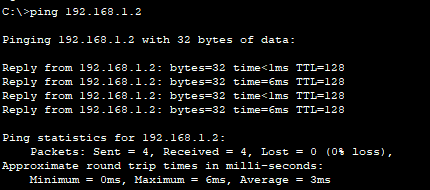
ping from pc16 to pc17
They're originally in the same VLAN, so of course the ping should go through.
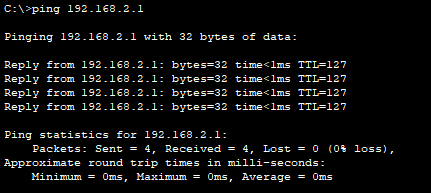
ping from pc16 to server1
You can confirm Inter-VLAN is set up well. You can see the ping goes through even to a different VLAN in a different network range. Since it's a server, let's also check via a browser window.
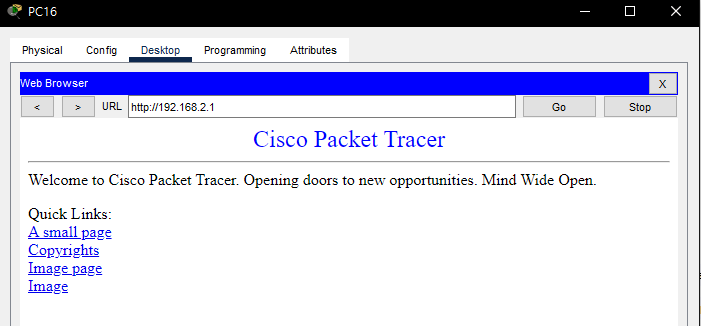
You can confirm it connects fine. Naturally 192.168.2.2 also connects fine.
Analysis
Running the simulation to check, the basic packet movement is no different from the MAC-address conversion I wrote before, but there's a difference on the router side.
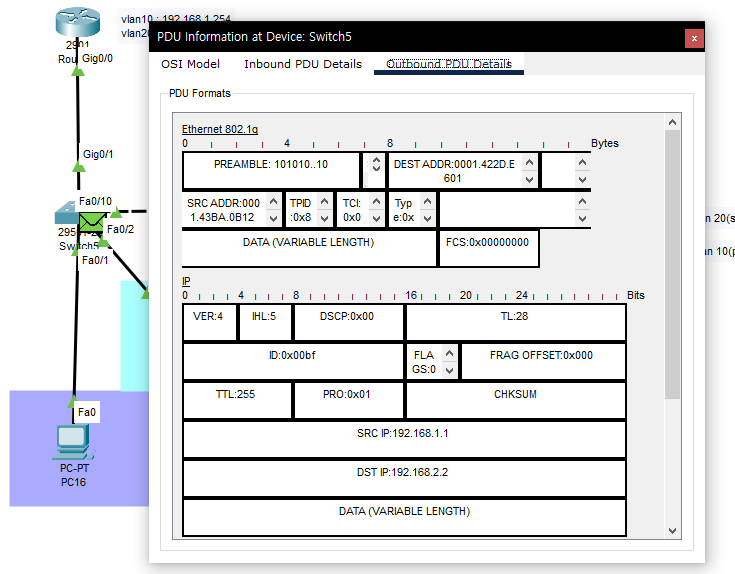
From the moment it leaves the switch for the router, it rides through the virtual port we created, so it enters something called Ethernet 802.1q.
Ethernet 802.1q (IEEE 802.1Q) is a network standard that supports virtual LANs (VLANs) on a single Ethernet network.
It seems to have been transmitted over this kind of network because it passed through the virtual port.
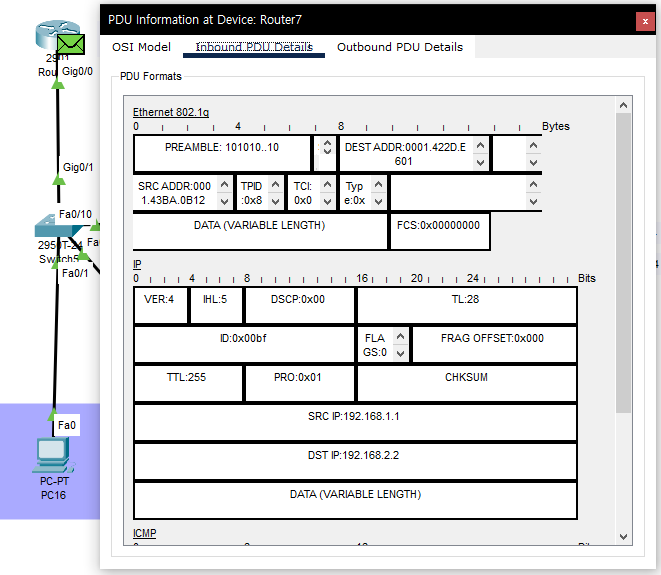
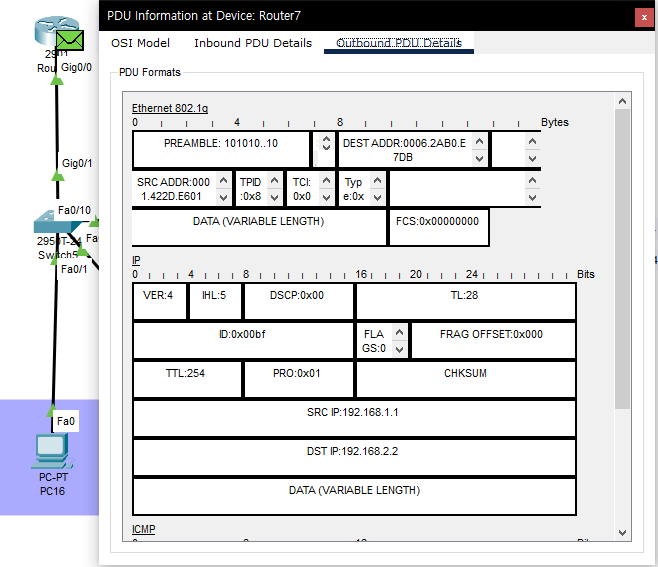
After that, the router likewise converts the DEST ADDR and SRC ADDR, rides back out the virtual port to the switch, moves switch to switch,
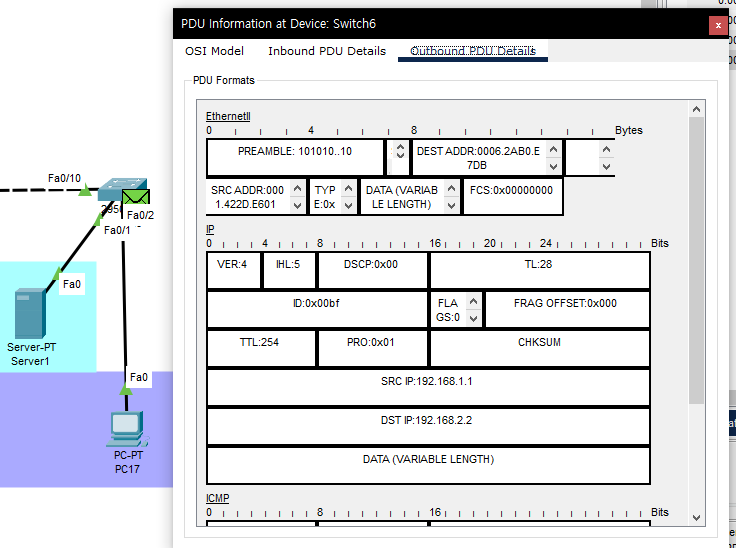
and on the right switch it's changed from the virtual network to Ethernet2 and transmitted. Other than this, it's the same as the MAC-address conversion done before.
Simulation & file (video)
The video service has ended, so this content cannot be played.
[
vlan.pkt
0.10MB
](https://blog.kakaocdn.net/dna/louWg/btrsVKCuU5U/AAAAAAAAAAAAAAAAAAAAAPhN4mc9ojZ7znwTV3b69jN6-w_3NDQNkMpWFjtn4isM/vlan.pkt?credential=yqXZFxpELC7KVnFOS48ylbz2pIh7yKj8&expires=1790780399&allow_ip=&allow_referer=&signature=4QewlGuqoMUQEs24YNFe7K0Z2ew%3D&attach=1&knm=tfile.pkt)
Original (Korean): tistory — published 2022-02-09, migrated to this blog. This translation was generated with the help of AI.