NAT
When going out from an internal network, it converts the internal IP address to another IP so it can leave to the outside.
① Static NAT: NAT that pre-maps and fixes the source and destination IPs in advance
② Dynamic NAT: NAT where neither source nor destination is decided in advance
Why did it come about?
Because of IPv4 exhaustion and private networks. The IPv4 currently used for internet addresses can allocate about 4.2 billion addresses. But that falls short of worldwide IP demand, so the problem of IP exhaustion is raised more and more over time. What came out to solve this is IPv6, and using it would settle the IP exhaustion problem at once, but it seems replacement isn't happening because of cost. Decisively, it's because of the private-network / public-network concept.
When you use the internet at home or at a company, you're issued one globally unique public IP from your ISP. Each actual PC has a private IP, and when connecting to the internet (the external network), the router's NAT technology converts each private IP into the public IP. In other words, one PC's worth of address is being shared and used by many.
IANA (Internet Assigned Numbers Authority) reserves the following IP address blocks for use as private IP addresses.
⊙ 10.0.0.0 ~ 10.255.255.255.255
⊙ 172.16.0.0 ~ 172.31.255.255.255
⊙ 192.168.0.0 ~ 192.168.255.255
These are the public IP addresses the ISP provides to identify an internet user's local network.
⊙ 0.0.0.0 ~ 127.255.255.255
⊙ 128.0.0.0 ~ 191.255.255.255
⊙ 192.0.0.0 ~ 233.255.255.255
⊙ 224.0.0.0 ~ 239.255.255.255
⊙ 240.0.0.0 ~ 255.255.255.255
When a private network sends a packet outward, the router swaps the private IP for the public IP before sending, so for the response packet it looks up the conversion record and hands it back to the original host. But from outside, the destination address can only be specified as far as the router, so running a private network that can't be reached from outside is also excellent for security.
Static NAT
Topology
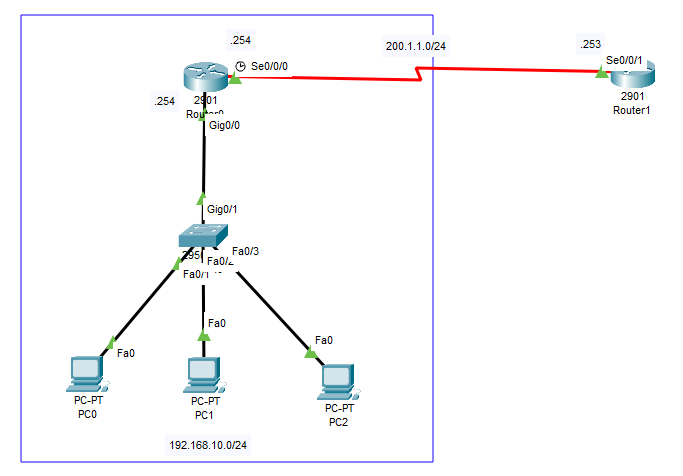
NAT Static
Assign PC0 ~ PC2 the addresses 192.168.10.1 ~ 192.168.10.3 and start configuring on the router.
Router(config)#int g0/0
Router(config-if)#no shut
Router(config-if)#ip add 192.168.10.254 255.255.255.0
Router(config-if)#ip nat inside
Router(config-if)#exit
Router(config)#int se0/0/0
Router(config-if)#no shut
Router(config-if)#ip add 200.1.1.254 255.255.255.0
Router(config-if)#ip nat outside
On Router0, assign an IP to Gig0/0 (gateway) and enter ip nat inside. On Se0/0/0, enter an IP and ip nat outside. Since Gig0/0 is the IP going from inside to outside, write inside there. The exit point naturally gets outside.
Router(config)#ip nat inside source static 192.168.10.1 200.1.1.1
Router(config)#ip nat inside source static 192.168.10.2 200.1.1.2
Router(config)#ip nat inside source static 192.168.10.3 200.1.1.3
Map it like internal IP (192.168.10.1) → external IP (200.1.1.1).
Router(config)#do sh ip nat trans
Pro  Inside global     Inside local       Outside local      Outside global
---  200.1.1.1         192.168.10.1       ---                ---
---  200.1.1.2         192.168.10.2       ---                ---
---  200.1.1.3         192.168.10.3       ---                ---
You can verify with [do] sh ip nat trans. Next, just assign an IP to Router1.
Router(config)#int se0/0/1
Router(config-if)#ip add 200.1.1.253 255.255.255.0
Let's fire a ping from a PC to Router1.
NAT: s=192.168.10.1->200.1.1.1, d=200.1.1.253 [42]
NAT*: s=200.1.1.253, d=200.1.1.1->192.168.10.1 [26]
You can see it converts and goes through fine. [ command: debug ip nat on the router ]
Dynamic NAT
Topology
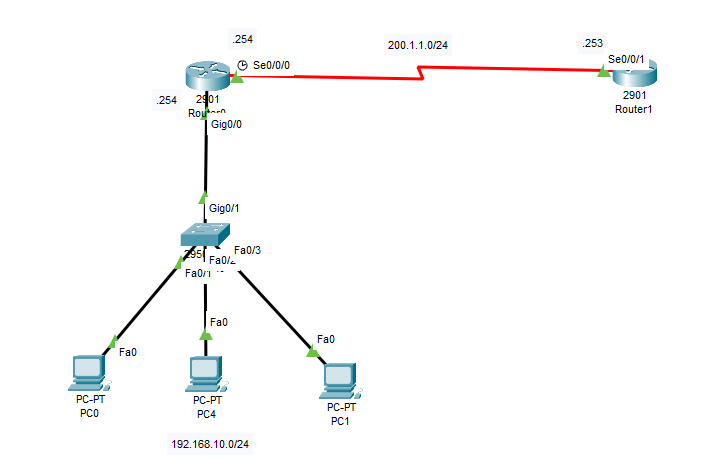
NAT dynamic
Like in static NAT, enter inside on Gig0/0 and outside on se0/0/0. Then just set up an access list (ACL).
Router(config)#access-list 10 permit 192.168.10.0 0.0.0.255
access-list [list number] permit [private IP network address] [wildcard mask]
A wildcard mask is a normal netmask written in reverse. 255.255.255.0 → 0.0.0.255 — both do the same job, but a subnet mask was created to separate network and host addresses so it can only use contiguous bits, whereas a wildcard mask can be used even non-contiguously — that's its characteristic.
An access-list is the list of private IPs accessing the router. Starting from the 192.168.10.0 range, it dynamically assigns a public IP to every private IP holding that network address, and once done, reclaims it for use elsewhere. Done this way, even a new PC gets assigned automatically — a very convenient feature.
Router(config)#ip nat pool Sunrin1 200.1.1.1 200.1.1.10 netmask 255.255.255.0
Router(config)#ip nat inside source list 10 pool Sunrin1
Create a public IP pool from 200.1.1.1 to 200.1.1.10 and attach it to list 10, which will use it.
Router(config)#do sh ip nat trans
Pro  Inside global     Inside local       Outside local      Outside global
icmp 200.1.1.1:5       192.168.10.1:5     200.1.1.253:5      200.1.1.253:5
icmp 200.1.1.1:6       192.168.10.1:6     200.1.1.253:6      200.1.1.253:6
icmp 200.1.1.1:7       192.168.10.1:7     200.1.1.253:7      200.1.1.253:7
When you ping from a PC, you can confirm an IP was assigned.
PAT
Topology
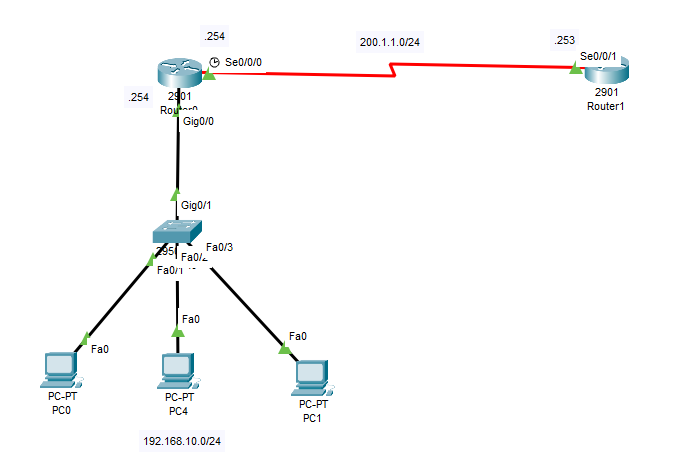
PAT
Like dynamic NAT, set up an access list (ACL).
Router(config)#access-list 10 permit 192.168.10.0 0.0.0.255
Now configure PAT.
Router(config)#ip nat inside source list 10 interface se0/0/0 overload
Router#sh ip nat trans
Pro  Inside global     Inside local       Outside local      Outside global
icmp 200.1.1.254:36    192.168.10.1:36    200.1.1.253:36     200.1.1.253:36
icmp 200.1.1.254:37    192.168.10.1:37    200.1.1.253:37     200.1.1.253:37
icmp 200.1.1.254:38    192.168.10.1:38    200.1.1.253:38     200.1.1.253:38
icmp 200.1.1.254:39    192.168.10.1:39    200.1.1.253:39     200.1.1.253:39
Since we attached the 192.168.10.0 private network to the router's interface when configuring PAT, the interface address 200.1.1.253 is attached to the Inside global as it goes out. And on the way out and back, the router checks the port number to identify where the original source was and delivers it. There are plenty of port numbers available.
Original (Korean): tistory — published 2022-01-27, migrated to this blog. This translation was generated with the help of AI.